
Unreal Engine——《Aura》Gameplay Ability System学习报告

虚幻引擎5 - 游戏技能系统(GAS) - 俯视角RPG
Create a multiplayer RPG with Unreal Engine’s Gameplay Ability System (GAS)!
0.Introduction / 介绍
1个讲座·12 分钟 / 1 Lecture · 12 Minutes
Introduction
12:07
1.Project Creation / 项目创建
14 个讲座·2 小时 26 分钟 / 14 Lectures · 2 Hours 26 Minutes
Jetbrains Rider - Now Free for Non-Commercial Use!
00:26
Project Creation
04:56
Setting up Version Control (Optional)
07:26
The Base Character Class
10:00
🧙♀️ AuraCharacterBase 基类分析
类定义特性
1 | UCLASS(Abstract) // 标记为抽象类,不能被实例化 |
- 抽象基类:只作为父类被继承,不能直接放置到关卡中
- 设计目的:提供通用功能给英雄和敌人角色共享
构造函数核心实现
1. Tick 系统禁用
1 | PrimaryActorTick.bCanEverTick = false; |
- 性能优化:角色不需要每帧更新时禁用 Tick
- 典型场景:AI 控制或简单动画的角色
2. 武器组件创建
1 | Weapon = CreateDefaultSubobject<USkeletalMeshComponent>("Weapon"); |
- **
CreateDefaultSubobject**:在构造函数中创建组件 - 命名规范:给组件指定唯一名称便于调试
3. 武器附着系统
1 | Weapon->SetupAttachment(GetMesh(), FName("WeaponHandSocket")); |
- 附着到骨骼:绑定到网格体的指定骨骼插槽
- **
FName("WeaponHandSocket")**:使用骨骼插槽名称 - 动画同步:武器随角色动画自然移动
4. 碰撞设置
1 | Weapon->SetCollisionEnabled(ECollisionEnabled::NoCollision); |
- **
NoCollision**:禁用武器所有碰撞 - 设计考虑:
- 避免武器与环境的意外碰撞
- 伤害检测通过其他系统实现(如伤害盒)
UPROPERTY 配置
1 | UPROPERTY(EditAnywhere, Category = "Combat") |
- **
EditAnywhere**:可在蓝图实例和类默认值中编辑 - **
Category = "Combat"**:在编辑器”Combat”分类下显示 - **
TObjectPtr**:UE5 安全指针,自动处理垃圾回收
架构设计意义
继承结构
1 | ACharacter (UE基类) |
职责分离
1. **基类**:通用组件(武器、基础属性)
2. **派生类**:特定逻辑(玩家控制、AI行为)
扩展建议
武器系统增强
1 | // 可添加的扩展功能 |
GAS 集成预留
1 | // 为后续游戏技能系统准备 |
最佳实践
抽象基类:提取公共功能,减少代码重复
组件化设计:武器作为独立组件便于更换
性能优化:无Tick需求时及时禁用
碰撞分离:攻击检测与渲染碰撞分开处理
Player and Enemy Characters
06:09
Character Blueprint Setup
12:13
Animation Blueprints
14:30
Enhanced Input
09:43
Aura Player Controller
11:14
🎮 AuraPlayerController 分析
- 自定义玩家控制器,管理输入系统和光标控制
- 使用 UE5 增强输入系统(Enhanced Input)
- 支持 多人游戏网络复制
🔑 核心特性
1. 构造函数设置
1 | bReplicates = true; // 启用网络复制 |
- 作用:让服务器同步控制器状态到所有客户端
2. 输入系统初始化
1 | Subsystem->AddMappingContext(AuraContext, 0); |
- 优先级 0:基础输入上下文
- 使用
EditAnywhere可在编辑器中灵活设置
3. 光标控制配置
1 | bShowMouseCursor = true; |
- 显示鼠标光标
- 使用默认光标样式
4. 输入模式设置
1 | FInputModeGameAndUI InputModeData; |
- 游戏+UI混合模式:同时处理游戏输入和UI交互
- 不锁定鼠标:可自由移动出视口
- 输入时不隐藏光标:保持可见性
⚙️ 技术要点
- **
check()**:开发时断言验证资源有效性 - **
TObjectPtr**:UE5 推荐的对象指针(自动垃圾回收) - **
UEnhancedInputLocalPlayerSubsystem**:管理输入上下文的核心系统
🎯 应用场景
俯视角 RPG 游戏
需要鼠标交互的游戏
多人网络游戏
Movement Input
16:14
🔄 AuraPlayerController 输入系统升级
新增输入动作支持
1 | UPROPERTY(EditAnywhere, Category = "Input") |
- **
UInputAction**:增强输入系统的原子输入单位 - 可配置性:在编辑器中指定具体的移动输入动作
输入组件重写
1 | virtual void SetupInputComponent() override; // 重写输入绑定 |
- 扩展点:在父类基础上添加增强输入绑定
- 最佳实践:将输入绑定逻辑集中在此函数
SetupInputComponent 实现
1. 获取增强输入组件
1 | UEnhancedInputComponent* EnhancedInputComponent = |
- **
CastChecked**:安全转换,失败时断言崩溃 - 类型转换:将基础输入组件转为增强输入组件
2. 输入动作绑定
1 | EnhancedInputComponent->BindAction( |
- **
ETriggerEvent::Triggered**:输入持续触发(如按住按键) - 函数指针绑定:将输入事件连接到成员函数
Move 函数实现
1. 输入值解析
1 | const FVector2D InputAxisVector = InputActionValue.Get<FVector2D>(); |
- **
FVector2D**:二维输入向量(WASD/摇杆) - 泛型获取:安全获取指定类型的输入值
2. 方向计算
1 | const FRotator YawRotation(0.f, Rotation.Yaw, 0.f); // 仅保留偏航角 |
- 简化旋转:俯视角游戏中忽略俯仰和滚转
- 偏航角:控制角色左右旋转的方向
3. 坐标系转换
1 | const FVector ForwardDirection = |
- 旋转矩阵:将局部方向转换为世界方向
- 坐标系:
- X轴:前方向(前进/后退)
- Y轴:右方向(左移/右移)
4. 应用移动输入
1 | ControlledPawn->AddMovementInput(ForwardDirection, InputAxisVector.Y); |
- 向量分解:
- Y分量:控制前后移动(W/S)
- X分量:控制左右移动(A/D)
- 叠加效果:同时按下两个方向键产生对角线移动
输入流程总结
1 | 输入动作 → 绑定到函数 → 解析向量 → 计算方向 → 应用移动 |
设计优势
1. 灵活性
- 输入映射可在编辑器中配置
- 支持多种输入设备(键盘、手柄、鼠标)
2. 模块化
- 输入动作与逻辑分离
- 便于扩展新输入功能
3. 维护性
所有输入绑定集中管理
清晰的输入处理流程
Game Mode
13:23
🤺 AuraCharacter 玩家角色配置
角色运动组件设置
1. 朝向运动方向
1 | GetCharacterMovement()->bOrientRotationToMovement = true; |
- 自动朝向:角色自动转向移动方向
- 俯视角特性:视觉上更自然的移动反馈
- 替代方案:如果设为
false,需要手动控制旋转
2. 旋转速度配置
1 | GetCharacterMovement()->RotationRate = FRotator(0.f, 400.f, 0.f); |
- **
FRotator(Pitch, Yaw, Roll)**:三维旋转速度 - Yaw 400:适中的偏航旋转速度(每秒度数)
- Pitch/Roll 为 0:俯视角游戏通常不需要俯仰和滚转
3. 平面约束
1 | GetCharacterMovement()->bConstrainToPlane = true; |
- 平面锁定:将角色运动限制在水平面(X-Y平面)
- 初始对齐:游戏开始时自动对齐到平面
- 俯视角必要性:防止意外的Z轴移动
控制器旋转配置
禁用控制器旋转继承
1 | bUseControllerRotationPitch = false; |
- 完全解耦:角色旋转与控制器旋转完全独立
- 设计目的:
- 允许控制器单独控制相机
- 角色根据移动方向自动旋转
- 俯视角游戏的典型配置
配置效果总结
运动行为
1 | 输入处理 → 方向计算 → 自动旋转 → 应用移动 |
旋转关系
1 | 控制器(控制相机) |
对比分析
| 设置 | 开启效果 | 关闭效果 |
|---|---|---|
bOrientRotationToMovement |
自动面向移动方向 | 保持当前方向 |
bUseControllerRotationYaw |
跟随控制器偏转 | 旋转独立 |
bConstrainToPlane |
锁定水平移动 | 允许垂直移动 |
扩展应用
动画适配
- 自动朝向确保动画播放方向正确
- 移动停止时保持最后朝向
网络同步
- 旋转变化会通过网络复制
- 确保所有客户端看到一致的角色朝向
后续扩展点
1 | // 可添加的额外运动配置 |
最佳实践建议
1. **俯视角游戏**:保持这些设置不变
2. **第一/第三人称**:需要调整 `bUseControllerRotationYaw = true`
3. **特殊移动**:可能需要禁用平面约束
4. **性能考量**:合理的旋转速率避免视觉不适
-
Enemy Interface
06:38
🎯 Unreal Engine 接口系统深入解析
双类接口架构
1. UInterface(反射类)
1 | UINTERFACE(MinimalAPI) |
- **
UINTERFACE**:UE宏,声明反射接口类 - **
MinimalAPI**:仅导出必要函数,减少编译依赖 - **继承自
UInterface**:UE接口基类 - 作用:为反射系统提供类型信息,可在蓝图中使用
2. IInterface(功能类)
1 | class GAS_AURA_API IEnemyInterface |
- 功能承载:实际定义接口方法
- **
GENERATED_BODY**:允许使用UE反射功能 - 核心:纯虚函数声明,强制派生类实现
⚡ 纯虚函数详解
语法特征
1 | virtual void FunctionName() = 0; |
- **
= 0**:纯虚函数标记 - 抽象性:没有默认实现
- 强制性:派生类必须实现
纯虚函数 vs 普通虚函数
| 特性 | 纯虚函数 | 普通虚函数 |
|---|---|---|
| 定义 | = 0 |
有默认实现 |
| 实现要求 | 必须在派生类实现 | 可选覆盖 |
| 类类型 | 使类成为抽象类 | 不强制 |
| 实例化 | 不能直接实例化 | 可以直接实例化 |
| UE中用途 | 接口定义 | 基类提供默认行为 |
🏗️ 接口设计模式
1. 角色高亮接口
1 | // 敌人交互可视化 |
2. 实现示例
1 | // 在敌人角色类中实现 |
🔧 UE接口系统工作机制
反射系统集成
1 | // 接口检查 |
蓝图支持
- 可在蓝图中实现接口
- 编辑器可识别接口类型
- 支持接口事件调度
🎮 游戏中的应用场景
敌人交互系统
flowchart TD
    Player[玩家鼠标悬停] --> Check[检查接口]
    Check -->|有接口| Highlight[调用高亮]
    Check -->|无接口| Ignore[忽略]
    PlayerLeave[鼠标离开] --> Unhighlight[取消高亮]
多态调用
1 | // 统一处理不同类型的敌人 |
💡 设计优势
1. 松耦合设计
- 调用者不关心具体实现类
- 只需知道接口协议
2. 扩展性
1 | // 可轻松添加新接口 |
3. 类型安全
- 编译时检查接口实现
- 避免运行时错误
🚀 最佳实践
接口命名规范
I前缀:功能接口类(IEnemyInterface)U前缀:反射接口类(UEnemyInterface)- 清晰语义:接口名描述能力而非身份
纯虚函数设计
1 | // 好的设计:职责单一 |
UE特定技巧
1 | // 蓝图可调用版本 |
📊 总结对比
| 方案 | 接口 | 继承 | 组件 |
|---|---|---|---|
| 适用场景 | 跨类共享能力 | 类层次关系 | 功能模块化 |
| 耦合度 | 低 | 高 | 中 |
| 灵活性 | 高 | 低 | 高 |
| UE集成 | 蓝图友好 | 标准继承 | 编辑器友好 |
| 性能 | 虚函数开销 | 虚函数开销 | 可能更高 |
接口最适合:定义”能做什么”而不是”是什么”,特别是需要跨不同类层次共享功能的场景。
-
Highlight Enemies
19:25
🎯 鼠标光标追踪与敌人高亮系统
新增核心成员变量
1 | void CursorTrace(); // 光标追踪方法 |
🔍 PlayerTick 集成
1 | virtual void PlayerTick(float DeltaTime) override; |
- 每帧调用:启用 Actor Tick 系统
- 实时检测:持续追踪鼠标下方的敌人
- 性能考虑:简单的射线检测开销较小
🎮 CursorTrace 方法详解
1. 光线投射检测
1 | FHitResult CursorHit; |
- **
GetHitResultUnderCursor**:从光标位置发射射线 - **
ECC_Visibility**:可见性碰撞通道 - **
false**:不启用复杂碰撞检测 - 返回值:包含击中信息的
FHitResult
2. 接口指针转换
1 | LastActor = ThisActor; // 保存上一帧结果 |
- **
Cast<IEnemyInterface>**:尝试将 Actor 转换为敌人接口 - 自动转换:如果 Actor 实现了接口,返回有效指针;否则返回
nullptr - 指针传递:使用
TObjectPtr安全存储接口指针
🧠 智能状态管理逻辑
状态转移矩阵
1 | 上一帧 (LastActor) 当前帧 (ThisActor) 操作 |
代码实现逻辑
1 | // 情况 C 和 D:需要取消上一帧的高亮 |
💡 设计亮点分析
1. 无状态切换优化
1 | // 避免了重复调用 |
2. 接口安全调用
1 | // 空指针安全检查已包含在条件判断中 |
3. 帧间连贯性
- 平滑过渡:从高亮到非高亮状态自然切换
- 无闪烁:避免同一物体反复高亮/取消
🚀 扩展可能性
性能优化
1 | // 可添加距离检测 |
视觉效果增强
1 | // 可添加淡入淡出效果 |
多目标支持
1 | // 未来可扩展为区域选择 |
📊 与其他系统集成
flowchart TD
    Input[鼠标移动事件] --> Tick[PlayerTick调用]
    Tick --> Trace[CursorTrace光线检测]
    Trace --> Interface[获取敌人接口]
    Interface --> Check[状态检查]

    Check -->|新敌人| Highlight[调用高亮接口]
    Check -->|离开敌人| Unhighlight[调用取消高亮接口]
    Check -->|同一敌人| NoAction[无操作]

    Highlight -->|触发| Enemy[敌人视觉效果]
    Unhighlight -->|触发| Enemy
⚠️ 注意事项
性能考虑
- 每帧调用:确保
CursorTrace逻辑轻量 - 射线检测:使用合适的碰撞通道和复杂度
- 接口调用:虚函数调用有一定开销
网络同步
1 | // 如果是多人游戏,需要考虑 |
用户体验
- 响应速度:立即反馈鼠标悬停
- 视觉清晰:高亮效果明显但不刺眼
- 逻辑一致:确保不会同时高亮多个敌人
核心改进:通过每帧的鼠标射线检测,实现了智能的敌人高亮系统,为后续的敌人选择和战斗交互奠定了基础。
-
Post Process Highlight
13:19
👾 AuraEnemy 敌人实现类
多重继承结构
1 | class AAuraEnemy : public AAuraCharacterBase, public IEnemyInterface |
- 角色基类:继承通用的角色功能(武器、移动等)
- 敌人接口:实现高亮交互能力
碰撞通道配置
1 | GetMesh()->SetCollisionResponseToChannel(ECC_Visibility, ECR_Block); |
- 可见性通道阻挡:确保光标射线能检测到敌人
- 相机通道忽略:防止相机与敌人网格体碰撞
自定义深度高亮实现
1 | GetMesh()->SetRenderCustomDepth(true); |
- 渲染通道:使用自定义深度渲染实现轮廓高亮
- 模板值:
CUSTOM_DEPTH_RED定义高亮颜色(通常在项目头文件中定义) - 武器同步:武器组件也应用相同的高亮效果
核心:通过UE的渲染系统实现视觉反馈,将接口逻辑转化为具体的视觉效果。
📚 第一章关键方法总结
基础类定义
1 | UCLASS(Abstract) // 声明为抽象类,不可直接实例化 |
组件创建与设置
1 | PrimaryActorTick.bCanEverTick = false; // 禁用Actor Tick |
玩家控制器配置
1 | bReplicates = true; // 启用网络复制 |
增强输入系统
1 | UEnhancedInputLocalPlayerSubsystem* Subsystem = |
角色移动处理
1 | const FVector2D InputAxisVector = InputActionValue.Get<FVector2D>(); // 获取2D输入 |
角色运动组件配置
1 | GetCharacterMovement()->bOrientRotationToMovement = true; // 朝向移动方向 |
接口系统
1 | UINTERFACE(MinimalAPI) // 声明反射接口类 |
光标追踪与接口调用
1 | GetHitResultUnderCursor(ECC_Visibility, false, CursorHit); // 光标射线检测 |
自定义深度渲染
1 | SetRenderCustomDepth(true); // 启用自定义深度渲染 |
状态管理逻辑
1 | if (LastActor != nullptr && LastActor != ThisActor) // 需要取消高亮的情况 |
2.Intro to the Gameplay Ability System / 游戏技能系统介绍
8个讲座·1小时 23 分钟 / 8 Lectures · 1 Hour 23 Minutes
The Gameplay Ability System
12:14
The Main Parts of GAS
08:46
The Player State
04:28
🎮 AuraPlayerState 玩家状态类
类定义
1 | UCLASS() |
- 继承自
APlayerState:UE内置玩家状态基类 - 功能:存储玩家游戏数据(经验值、等级、属性点等)
构造函数配置
1 | AAuraPlayerState::AAuraPlayerState() |
关键参数解析
| 参数 | 类型 | 默认值 | 功能说明 |
|---|---|---|---|
NetUpdateFrequency |
float |
2.0f |
网络更新频率(单位:Hz) |
MinNetUpdateFrequency |
float |
2.0f |
最小更新频率 |
bReplicateRelevancyInfo |
bool |
true |
是否复制相关性信息 |
NetUpdateFrequency 详解
1 | // 不同场景的设置建议 |
网络同步流程
1 | 服务器端 PlayerState |
典型应用场景
1 | // 存储玩家数据 |
设计考虑
1. **高频更新**:确保属性变化即时同步
2. **带宽控制**:100Hz比默认2Hz消耗更多带宽
3. **游戏类型适配**:根据需求调整频率
4. **GAS集成**:为后续Gameplay Ability System做准备
核心作用:作为玩家数据的网络同步载体,为RPG系统提供基础支持。
-
Ability System Component and Attribute Set
05:08
-
GAS in Multiplayer
10:29
-
Constructing the ASC and AS
12:13
🏗️ GAS 架构设计:分离式组件挂载
核心架构对比
| 组件 | 玩家角色 | 敌人角色 | 设计原因 |
|---|---|---|---|
| ASC | 挂载在 PlayerState |
挂载在 EnemyBase |
玩家数据需要跨关卡保存 |
| AS | 挂载在 PlayerState |
挂载在 EnemyBase |
属性与角色生命期绑定 |
| 网络复制 | PlayerState 复制 |
Enemy 自身复制 |
玩家状态持久化需求 |
1. 抽象基类设计
接口实现
1 | // 头文件:AuraCharacterBase.h |
接口方法实现
1 | // 源文件:AuraCharacterBase.cpp |
2. 玩家实现:PlayerState 挂载
构造函数初始化
1 | // AuraPlayerState.cpp |
玩家角色获取ASC
1 | // 玩家角色需要通过PlayerState获取ASC |
3. 敌人实现:Enemy 自身挂载
构造函数初始化
1 | // AuraEnemy.cpp |
敌人角色获取ASC
1 | // 敌人可以直接从自身获取ASC |
4. 设计哲学分析
玩家数据持久化
1 | // PlayerState的生命周期 |
敌人临时性
1 | // Enemy的生命周期 |
5. 网络复制策略
玩家复制模式
1 | // PlayerState中设置 |
敌人复制模式
1 | // Enemy中设置(相同) |
6. 访问模式对比
| 操作 | 玩家代码 | 敌人代码 |
|---|---|---|
| 获取ASC | GetPlayerState()->GetAbilitySystemComponent() |
GetAbilitySystemComponent() |
| 获取AS | GetPlayerState()->GetAttributeSet() |
GetAttributeSet() |
| 应用效果 | 通过PlayerState的ASC | 直接通过自身ASC |
| 监听属性 | 监听PlayerState的AS | 监听自身AS |
7. 优势和考量
优势
1. **数据分离**:玩家进度与角色实体解耦
2. **持久化**:玩家死亡/重生不丢失属性
3. **网络优化**:PlayerState可独立复制频率
4. **存档友好**:PlayerState数据易于序列化
考量
1. **访问路径**:玩家需通过PlayerState访问,增加间接性
2. **初始化时机**:需确保PlayerState在角色之前创建
3. **引用管理**:注意PlayerState与角色的生命周期差异
总结
这种分离式架构是多人RPG游戏的最佳实践:
- 玩家:
PlayerState作为数据容器,支持进度保存 - 敌人:
Enemy自身承载数据,简化生命周期管理
为后续的属性系统、技能系统和伤害计算奠定了坚实的架构基础。
-
Replication Mode
07:44
🌐 GAS 网络复制模式配置
1. 玩家状态:Mixed 复制模式
1 | // PlayerState 构造函数新增 |
Mixed 模式特点
- 本地玩家:接收完整的GameplayEffect数据
- 其他玩家:只接收最小必要数据
- 适用场景:玩家自己的角色(需要完整数据),AI控制的角色用Minimal
2. 敌人:Minimal 复制模式
1 | // Enemy 构造函数新增 |
Minimal 模式特点
- 只复制:GameplayTags和持续时间
- 不复制:具体的属性修改值
- 适用场景:AI敌人、小兵(带宽优化)
**3. 复制模式对比表
| 复制模式 | 使用场景 | 描述 |
|---|---|---|
| Full(完整) | 单人游戏 | Gameplay Effects 复制到所有客户端 |
| Mixed(混合) | 多人游戏,玩家控制 | Gameplay Effects 仅复制到所属客户端。Gameplay Cues 和 Gameplay Tags 复制到所有客户端。 |
| Minimal(最小) | 多人游戏,AI控制 | Gameplay Effects 不进行复制。Gameplay Cues 和 Gameplay Tags 复制到所有客户端。 |
设计考虑
1. **网络优化**:根据角色重要性选择复制模式
2. **带宽控制**:敌人用Minimal节省服务器资源
3. **玩家体验**:本地玩家需要完整数据计算伤害等
4. **一致性**:保持接口实现的一致性
-
Init Ability Actor Info
22:01
🎮 GAS 初始化系统
1. 敌人角色初始化
1 | // AuraEnemy.cpp - BeginPlay() |
InitAbilityActorInfo 参数
1 | InitAbilityActorInfo( |
- 拥有者:逻辑上的所有者(敌人自身)
- 化身:实际执行动作的实体(敌人自身)
- 敌人场景:Owner和Avatar都是敌人自己
2. 玩家角色初始化
服务器端初始化
1 | // AuraCharacter.cpp - PossessedBy() |
- 触发时机:服务器获得角色控制权时
- 典型场景:玩家加入游戏、重生时
客户端初始化
1 | // AuraCharacter.cpp - OnRep_PlayerState() |
- 触发时机:客户端PlayerState同步完成时
- 网络复制:通过
OnRep_PlayerState响应复制事件
3. 玩家ASC初始化实现
1 | // AuraCharacter.cpp - InitAbilityActorInfo() |
玩家参数对比
1 | InitAbilityActorInfo( |
4. 初始化时机对比表
| 角色类型 | 服务器初始化 | 客户端初始化 | Owner | Avatar |
|---|---|---|---|---|
| 玩家 | PossessedBy() |
OnRep_PlayerState() |
PlayerState | 角色 |
| 敌人 | BeginPlay() |
BeginPlay() |
敌人自身 | 敌人自身 |
5. 关键函数作用
InitAbilityActorInfo()
1 | // GAS核心初始化函数 |
- 绑定关系:建立Owner、Avatar与ASC的关联
- 激活系统:使GAS开始工作
- 必需调用:未调用则技能系统无法使用
check() 宏
1 | check(AuraPlayerState); // 开发时验证,失败则崩溃 |
- 调试辅助:确保关键对象存在
- 发布版本:自动移除,不影响性能
设计模式总结
- 玩家:分离式初始化(Owner=PlayerState, Avatar=角色)
- 敌人:一体化初始化(Owner=Avatar=敌人自身)
- 网络同步:确保两端都正确初始化
- 生命周期:在合适的时机触发初始化
📚 第二章关键方法总结
GAS核心组件定义
1 | UCLASS() |
网络更新频率设置
1 | NetUpdateFrequency = 100.f; // 设置网络更新频率为100Hz(默认2Hz) |
GAS接口实现
1 | class AAuraCharacterBase : public ACharacter, public IAbilitySystemInterface // 继承GAS接口 |
ASC(能力系统组件)创建
1 | AbilitySystemComponent = CreateDefaultSubobject<UAuraAbilitySystemComponent>("AbilitySystemComponent"); |
AS(属性集)创建
1 | AttributeSet = CreateDefaultSubobject<UAuraAttributeSet>("AttributeSet"); |
GAS复制模式设置
1 | AbilitySystemComponent->SetReplicationMode(EGameplayEffectReplicationMode::Mixed); // 玩家:混合模式 |
GAS初始化系统调用
1 | ASC->InitAbilityActorInfo(OwnerActor, AvatarActor); // 核心初始化函数 |
玩家初始化时机函数
1 | virtual void PossessedBy(AController* NewController) override; // 服务器端初始化 |
断言验证宏
1 | check(AuraPlayerState); // 开发时验证对象有效性 |
复制模式枚举值
1 | EGameplayEffectReplicationMode::Full // 完整复制(单人游戏) |
玩家状态获取
1 | AAuraPlayerState* AuraPlayerState = GetPlayerState<AAuraPlayerState>(); // 获取玩家状态 |
组件引用保存
1 | AbilitySystemComponent = AuraPlayerState->GetAbilitySystemComponent(); // 保存ASC引用 |
3.Attributes / 属性
4个讲座·1小时1分钟 / 4 Lectures · 1 Hour 1 Minute
Attributes
06:59
Attributes are numerical quantities associated with a given entity in the game, all attributes are floats, they exist within a structure called FGameplayAttributeData.
属性是与游戏中特定实体相关联的数值量,所有属性均为浮点数,它们存在于名为FGameplayAttributeData的结构中。
-
Health and Mana
17:44
🏥 AuraAttributeSet 属性集实现
1. 类定义和属性声明
1 | UCLASS() |
代码功能
1. **继承UAttributeSet**:GAS属性系统的基类
2. **网络复制配置函数**GetLifetimeReplicatedProps:告诉UE哪些属性需要网络复制
3. **声明Health属性**:使用`FGameplayAttributeData`类型存储生命值
4. **声明OnRep_Health函数**:属性复制完成时的回调函数
2. 构造函数实现
1 | UAuraAttributeSet::UAuraAttributeSet() |
3. 网络复制配置
1 | void UAuraAttributeSet::GetLifetimeReplicatedProps(TArray<FLifetimeProperty>& OutLifetimeProps) const |
DOREPLIFETIME_CONDITION_NOTIFY宏解析
1 | DOREPLIFETIME_CONDITION_NOTIFY( |
作用
- 告诉UE:
Health属性需要通过网络同步 - 条件
COND_None:任何情况下都复制 - 通知
REPNOTIFY_Always:属性变化时总是通知
4. OnRep函数实现
1 | void UAuraAttributeSet::OnRep_Health(const FGameplayAttributeData& OldHealth) const |
GAMEPLAYATTRIBUTE_REPNOTIFY宏功能
1 | // 这个宏内部执行三个操作: |
OnRep_Health参数
1 | const FGameplayAttributeData& OldHealth // 参数:属性复制前的旧值 |
5. 完整执行流程
服务器端发生属性变化
1 | 服务器: |
客户端接收属性变化
1 | 客户端: |
6. 代码结构总结
1 | // 每个属性需要三部分: |
7. 核心机制
网络复制:服务器向客户端同步属性值
回调通知:属性复制完成后调用指定函数
自动同步:GAS系统自动处理属性变化和UI更新
Attribute Accessors
12:05
🚀 AuraAttributeSet 属性集升级
1. 新增:属性访问器宏定义
1 |
宏展开后的效果
1 | // 以Health为例,ATTRIBUTE_ACCESSORS(UAuraAttributeSet, Health) 展开为: |
2. 属性声明新增宏调用
1 | UPROPERTY(BlueprintReadOnly, ReplicatedUsing = OnRep_Health, Category = "Vital Attributes") |
3. 构造函数初始化属性值
1 | UAuraAttributeSet::UAuraAttributeSet() |
Init函数来源
1 | // 来自宏:GAMEPLAYATTRIBUTE_VALUE_INITTER(PropertyName) |
4. 生成的访问函数使用示例
获取属性值
1 | // 通过宏生成的Get函数 |
设置属性值
1 | // 通过宏生成的Set函数 |
5. 宏的功能详解
| 宏组件 | 生成的函数 | 作用 |
|---|---|---|
GAMEPLAYATTRIBUTE_PROPERTY_GETTER |
GetHealthAttribute() |
获取属性的元数据(类型、名称等) |
GAMEPLAYATTRIBUTE_VALUE_GETTER |
GetHealth() |
获取属性的当前值(float) |
GAMEPLAYATTRIBUTE_VALUE_SETTER |
SetHealth(float) |
设置属性的当前值 |
GAMEPLAYATTRIBUTE_VALUE_INITTER |
InitHealth(float) |
初始化属性的基础值 |
6. 代码结构对比
升级前(手动管理)
1 | // 获取值 |
升级后(宏辅助)
1 | // 获取值(简洁) |
7. 关键改进总结
1. **代码简化**:宏自动生成Get/Set/Init函数
2. **类型安全**:统一的访问接口
3. **初始化标准化**:构造函数中统一初始化所有属性
4. **可维护性**:属性声明和访问函数绑定在一起
使用新宏的优势
1 | // 之前:手动编写每个属性的访问函数 |
-
Effect Actor
24:20
⚠️ AuraEffectActor 临时效果实现与const_cast问题
1. Actor基础结构
1 | UCLASS() |
2. 当前的临时解决方案
1 | void AAuraEffectActor::OnOverlap(...) |
3. const_cast的问题分析
什么是const_cast?
1 | // const_cast语法:移除或添加const修饰符 |
const_cast的严重问题
问题1:违反const承诺
1 | // GetAttributeSet返回const指针的承诺: |
问题2:绕过GAS系统
1 | // GAS正确的属性修改方式: |
问题3:网络同步问题
1 | // GAS修改属性会: |
4. 总结:为什么const_cast是坏的
| 问题 | 后果 | 正确做法 |
|---|---|---|
| 违反const约定 | 破坏代码安全性,可能导致崩溃 | 使用const正确的方法 |
| 绕过GAS系统 | 不触发事件、UI不更新 | 通过ASC应用GameplayEffect |
| 网络不同步 | 多人游戏不同步 | GAS自动处理网络复制 |
| 代码维护困难 | 难以调试和追踪 | 使用标准GAS流程 |
注释中的TODO:
1 | //TODO: 将此更改为应用游戏效果,目前使用 const_cast 作为临时解决方案! |
-
Section 4 Quiz
3 问题
📚 第三章关键方法总结
属性集类定义
1 | UCLASS() |
属性声明
1 | UPROPERTY(BlueprintReadOnly, ReplicatedUsing = OnRep_Health, Category = "Vital Attributes") |
属性访问器宏
1 |
|
属性初始化
1 | InitHealth(100.f) // 初始化属性值 |
属性访问函数
1 | GetHealth() // 获取当前生命值 |
网络复制配置
1 | virtual void GetLifetimeReplicatedProps(TArray<FLifetimeProperty>& OutLifetimeProps) const override |
复制通知函数
1 | UFUNCTION() |
属性数据类型
1 | FGameplayAttributeData // GAS属性数据类型 |
复制条件枚举
1 | COND_None // 无条件复制 |
通知策略枚举
1 | REPNOTIFY_Always // 总是通知 |
属性分类
1 | Category = "Vital Attributes" // 重要属性分类 |
危险操作(临时方案)
1 | const_cast<UAuraAttributeSet*>(AuraAttributeSet) // 移除const修饰符(危险) |
属性集获取
1 | GetAbilitySystemComponent()->GetAttributeSet(UAuraAttributeSet::StaticClass()) |
宏生成的函数类型
1 | GAMEPLAYATTRIBUTE_PROPERTY_GETTER // 属性元数据获取器 |
属性模式
1 | Health / MaxHealth // 当前值/最大值配对模式 |
属性变化响应流程
1 | 服务器修改 → 网络复制 → 客户端OnRep回调 → GAMEPLAYATTRIBUTE_REPNOTIFY → UI更新 |
4.RPG Game UI / RPG游戏用户界面
9 个讲座·2 小时 27 分钟 / 9 Lectures · 2 Hours 27 Minutes
Game UI Architecture
07:36
View(表现层):
数据的视觉表现(eg:血条 法力值等等)
–>AuraUserWidget
(Widget)Controller(控制层):
作为 View 和 Model 的中介 View想改变视觉表现得通过 Controller 而 Model向 View 传递数据得通过 Controller
–>AuraWidgetController
Model(数据层):
相当于数据库 存放Attribute 的值(FGameplayAttribute)
–>UAuraAttributeSet
-
Aura User Widget and Widget Controller
10:39
🎮 Aura UI 系统的 MVC 架构实现
1. 架构总览
graph TD
Model[Model层
UAttributeSet] -->|数据变化| Controller[Controller层
UAuraWidgetController]
Controller -->|更新通知| View[View层
UAuraUserWidget]
View -->|用户交互| Controller
2. Controller层:UAuraWidgetController
1 | UCLASS() |
四个数据源的作用
1 | 1. PlayerController: 处理玩家输入、相机控制 |
3. View层:UAuraUserWidget
1 | UCLASS() |
4. SetWidgetController函数实现
1 | void UAuraUserWidget::SetWidgetController(UObject* InWidgetController) |
函数调用流程
1 | // 在蓝图或C++中调用: |
5. 蓝图事件:WidgetControllerSet
1 | // C++声明(接口) |
BlueprintImplementableEvent特性
1 | // 这个宏创建的函数: |
6. 数据流向示例
生命值更新流程
1 | // 1. 模型层变化 |
7. 使用UObject作为基类的设计考虑
1 | // WidgetController类型: |
类型安全转换
1 | // 在蓝图中使用: |
8. MVC架构优势
| 层 | 职责 | 优势 |
|---|---|---|
| Model | 数据(AttributeSet) | 数据与显示分离 |
| View | UI显示(UserWidget) | 纯显示逻辑,易于替换 |
| Controller | 业务逻辑(WidgetController) | 集中处理,易于维护 |
总结:这个MVC架构为UI系统提供了清晰的分层结构,为后续的复杂UI功能(属性面板、技能栏、背包等)奠定了坚实的基础。
-
Globe Progress Bar
28:38
-
Health Globe
10:38
-
Aura HUD
08:14
🖥️ AuraHUD:UI管理系统
1. HUD基类继承
1 | UCLASS() |
- 继承自
AHUD:虚幻引擎的HUD基类 - 作用:在游戏屏幕上显示UI
2. 成员变量声明
1 | public: |
变量详细说明
1 | // 1. OverlayWidget(实例) |
3. BeginPlay函数实现
1 | void AAuraHUD::BeginPlay() |
代码执行步骤
1 | 1. 游戏开始 → 调用BeginPlay() |
4. CreateWidget函数详解
1 | CreateWidget<UUserWidget>(GetWorld(), OverlayWidgetClass); |
函数参数
| 参数 | 值 | 作用 |
|---|---|---|
| 模板参数 | <UUserWidget> |
返回的指针类型 |
| 参数1 | GetWorld() |
当前的游戏世界 |
| 参数2 | OverlayWidgetClass |
要创建的Widget类 |
5. AddToViewport函数
1 | Widget->AddToViewport(); |
- 功能:把Widget添加到游戏屏幕
- 效果:玩家可以看到这个UI
6. 当前代码的逻辑流程
graph LR
A[游戏开始] --> B[AAuraHUD::BeginPlay]
B --> C[CreateWidget创建UI]
C --> D[AddToViewport显示UI]
D --> E[玩家看到覆盖层界面]
7. 总结当前代码功能
1. **声明了一个UI类引用**:在编辑器中设置要显示哪个Widget
2. **游戏开始时创建UI**:在BeginPlay中实例化Widget
3. **显示到屏幕**:通过AddToViewport显示给玩家看
-
Overlay Widget Controller
32:15
🎮 Aura UI 系统的初始化流程
1. 新增:FWidgetControllerParams 结构体
1 | USTRUCT(BlueprintType) |
- 作用:打包UI需要的4个核心数据源
- 好处:一个结构体传递所有参数,代码更简洁
2. WidgetController参数设置函数
1 | void UAuraWidgetController::SetWidgetControllerParams(const FWidgetControllerParams& WCParams) |
- 功能:一次性设置Controller的所有数据源
- 调用时机:Controller创建后立即调用
3. HUD中的Controller管理
1 | // AuraHUD.h 新增成员 |
4. GetOverlayWidgetController函数(单例模式)
1 | UOverlayWidgetController* AAuraHUD::GetOverlayWidgetController(const FWidgetControllerParams& WCParams) |
- 单例模式:确保整个游戏只有一个OverlayController
- 懒加载:第一次需要时才创建
5. InitOverlay初始化函数
1 | void AAuraHUD::InitOverlay(APlayerController* PC, APlayerState* PS, |
6. 在玩家角色中初始化UI
1 | void AAuraCharacter::InitAbilityActorInfo() |
7. 代码执行流程
1 | 玩家加入游戏 → 角色被控制器拥有(PossessedBy) |
8. Cast操作的作用
1 | // 两次Cast确保类型正确: |
9. checkf断言函数
1 | checkf(OverlayWidgetClass, TEXT("错误信息")); |
-
Broadcasting Initial Values
25:37
📢 广播初始值系统
1. 新增虚函数 BroadcastInitialValues
1 | // 基类 UAuraWidgetController |
- 作用:通知UI显示属性的初始值
- 虚函数:子类可以重写实现特定逻辑
2. 基类实现(空函数)
1 | void UAuraWidgetController::BroadcastInitialValues() |
3. 派生类 UOverlayWidgetController 重写
1 | // OverlayWidgetController.h |
4. BroadcastInitialValues 实现
1 | void UOverlayWidgetController::BroadcastInitialValues() |
关键函数说明
1 | // 1. CastChecked |
5. 委托声明
1 | // OverlayWidgetController.h |
委托宏解析
1 | DECLARE_DYNAMIC_MULTICAST_DELEGATE_OneParam( |
6. HUD中的调用时机
1 | void AAuraHUD::InitOverlay(...) |
7. 完整的UI初始化流程
1 | 1. 创建Widget实例 |
8. 为什么需要广播初始值?
问题场景
1 | // 如果没有广播初始值: |
9. 广播的具体作用
1 | // OnHealtChanged.Broadcast(AuraAttributeSet->GetHealth()); |
-
Listening for Attribute Changes
11:58
📡 属性变化监听系统
1. 新增虚函数 BindCallbacksToDependencies
1 | // 基类 UAuraWidgetController |
- 作用:绑定属性变化监听器
- 虚函数:子类重写实现特定监听
2. 基类实现(空函数)
1 | void UAuraWidgetController::BroadcastInitialValues() |
3. OverlayWidgetController 实现
1 | void UOverlayWidgetController::BindCallbacksToDependencies() |
4. 关键函数详解
GetGameplayAttributeValueChangeDelegate
1 | // GAS提供的属性变化委托获取函数 |
- 参数:要监听的属性(通过GetHealthAttribute()获取)
- 返回:
FOnGameplayAttributeValueChange委托
AddUObject 绑定函数
1 | .AddUObject(this, &UOverlayWidgetController::HealthChanged) |
| 参数 | 作用 |
|---|---|
this |
拥有回调函数的对象 |
&UOverlayWidgetController::HealthChanged |
成员函数指针 |
5. 回调函数实现
1 | void UOverlayWidgetController::HealthChanged(const FOnAttributeChangeData& Data) const |
FOnAttributeChangeData 结构体
1 | // GAS提供的属性变化数据 |
6. HUD中的调用时机
1 | // GetOverlayWidgetController 函数中 |
7. 完整的UI初始化流程
1 | 1. 创建Widget实例 |
8. 工作流程示意图
sequenceDiagram
participant ASC as AbilitySystemComponent
participant Controller as OverlayWidgetController
participant UI as UserWidget
Note over ASC,UI: 1. 初始设置
Controller->>ASC: GetGameplayAttributeValueChangeDelegate(Health)
ASC-->>Controller: 返回委托
Note over ASC,UI: 2. 属性变化时
ASC->>ASC: Health属性值改变
ASC->>Controller: 触发HealthChanged回调
Controller->>UI: OnHealthChanged.Broadcast(新值)
UI->>UI: 更新生命条显示
9. 属性监听机制详解
委托绑定链
1 | // 完整的委托绑定链: |
实时响应优势
1 | // 相比每帧检查的优势: |
核心改进:从被动轮询变为事件驱动,UI实时响应属性变化,效率更高,响应更快。
-
Callbacks for Mana Changes
11:02
🔄 扩展Mana属性监听
1. 新增Mana相关委托
1 | // 声明Mana属性变化委托 |
2. 新增回调函数
1 | // 魔法值变化回调 |
3. BroadcastInitialValues 扩展
1 | void UOverlayWidgetController::BroadcastInitialValues() |
4. BindCallbacksToDependencies 扩展
1 | void UOverlayWidgetController::BindCallbacksToDependencies() |
5. 回调函数实现
1 | // 魔法值变化回调 |
总结:完全复制了Health属性的监听模式,为Mana属性建立了相同的监听机制,UI现在可以实时响应生命值和魔法值的变化。
📚 第四章关键方法总结
MVC架构定义
1 | UCLASS() |
数据传递结构体
1 | USTRUCT(BlueprintType) |
WidgetController参数设置
1 | void SetWidgetControllerParams(const FWidgetControllerParams& WCParams) // 设置4个数据源 |
UI创建与管理
1 | CreateWidget<T>(GetWorld(), WidgetClass) // 创建Widget实例 |
HUD单例Controller模式
1 | UOverlayWidgetController* GetOverlayWidgetController(const FWidgetControllerParams&) // 单例获取 |
属性变化委托声明
1 | DECLARE_DYNAMIC_MULTICAST_DELEGATE_OneParam(FOnHealthChangedSignature, float, NewHealth) |
委托变量声明
1 | UPROPERTY(BlueprintAssignable) |
虚函数框架
1 | virtual void BroadcastInitialValues() // 广播初始值 |
属性值获取
1 | AuraAttributeSet->GetHealth() // 获取生命值 |
属性变化监听绑定
1 | AbilitySystemComponent->GetGameplayAttributeValueChangeDelegate(属性) |
属性变化回调函数
1 | void HealthChanged(const FOnAttributeChangeData& Data) const // 属性变化响应 |
开发调试函数
1 | checkf(条件, TEXT("错误信息")) // 开发时断言检查 |
蓝图事件声明
1 | UFUNCTION(BlueprintImplementableEvent) |
WidgetController设置
1 | void SetWidgetController(UObject* InWidgetController) // 设置Controller引用 |
UI初始化流程函数
1 | void InitOverlay(APlayerController*, APlayerState*, UAbilitySystemComponent*, UAttributeSet*) |
数据类型与指针
1 | TObjectPtr<T> // UE5安全对象指针 |
5.Gameplay Effects / 游戏效果
12 个讲座·3 小时 31分钟 / 12 Lectures · 3 Hours 31 Minutes
Gameplay Effects
07:41
Effect Actor Improved
29:48
🎯 AuraEffectActor 改进:使用GameplayEffect系统
1. 类定义改进
1 | UCLASS() |
关键改进
1 | // 移除了之前的: |
2. ApplyEffectToTarget函数实现
1 | void AAuraEffectActor::ApplyEffectToTarget(AActor* Target, TSubclassOf<UGameplayEffect> GameplayEffectClass) |
3. 关键函数详解
GetAbilitySystemComponent
1 | UAbilitySystemBlueprintLibrary::GetAbilitySystemComponent(Target) |
- 作用:从Actor获取其AbilitySystemComponent
- 参数:
Target- 要获取ASC的目标Actor - 返回:目标的ASC指针(可能为nullptr)
MakeEffectContext
1 | TargetASC->MakeEffectContext() |
- 作用:创建GameplayEffect的上下文
- 上下文包含:施法者、目标、来源、时间戳等信息
AddSourceObject
1 | EffectContextHandle.AddSourceObject(this) |
- 作用:设置效果的来源对象
- 用途:用于追踪谁施加了这个效果
MakeOutgoingSpec
1 | TargetASC->MakeOutgoingSpec(GameplayEffectClass, 1.f, EffectContextHandle) |
| 参数 | 作用 |
|---|---|
GameplayEffectClass |
要创建的GameplayEffect类型 |
1.f |
效果的等级(Level) |
EffectContextHandle |
效果上下文 |
ApplyGameplayEffectSpecToSelf
1 | TargetASC->ApplyGameplayEffectSpecToSelf(*EffectSpecHandle.Data.Get()) |
- 作用:将GameplayEffect应用到自身
- 正确的方法:通过ASC系统应用,而不是直接修改属性
4. GameplayEffect应用流程
1 | 1. 获取目标的ASC |
5. 构造函数的简化
1 | AAuraEffectActor::AAuraEffectActor() |
- 移除了:Mesh和Sphere组件
- 简化了:只有一个SceneRoot作为根组件
- 更灵活:可以在蓝图中添加需要的组件
6. 与之前版本的对比
旧版本(错误)
1 | // 直接修改属性,绕过GAS |
新版本(正确)
1 | // 通过GAS系统应用效果 |
优势对比
| 方面 | 旧版本 | 新版本 |
|---|---|---|
| GAS集成 | 绕过系统 | 完全集成 |
| 网络同步 | 不同步 | 自动同步 |
| 事件触发 | 不触发 | 触发所有相关事件 |
| 安全性 | 危险(const_cast) | 安全 |
| 可扩展性 | 固定功能 | 可通过不同GameplayEffect实现不同效果 |
7. InstantGameplayEffectClass的使用
1 | UPROPERTY(EditAnywhere, Category="Applied Effects") |
- 在编辑器中设置:选择具体的GameplayEffect蓝图
- 即时效果:Instant类型的GameplayEffect(立即生效)
- 可配置:不同的Actor实例可以使用不同的效果
8. 如何使用这个Actor
1 | // 蓝图中: |
9. 修复的核心问题
1 | // 之前注释中的TODO已经实现: |
总结:这个改进将效果Actor从危险的临时方案变成了标准的GAS实现,通过GameplayEffect系统实现了安全、可扩展、网络同步的属性修改功能。
-
Instant Gameplay Effects
20:26
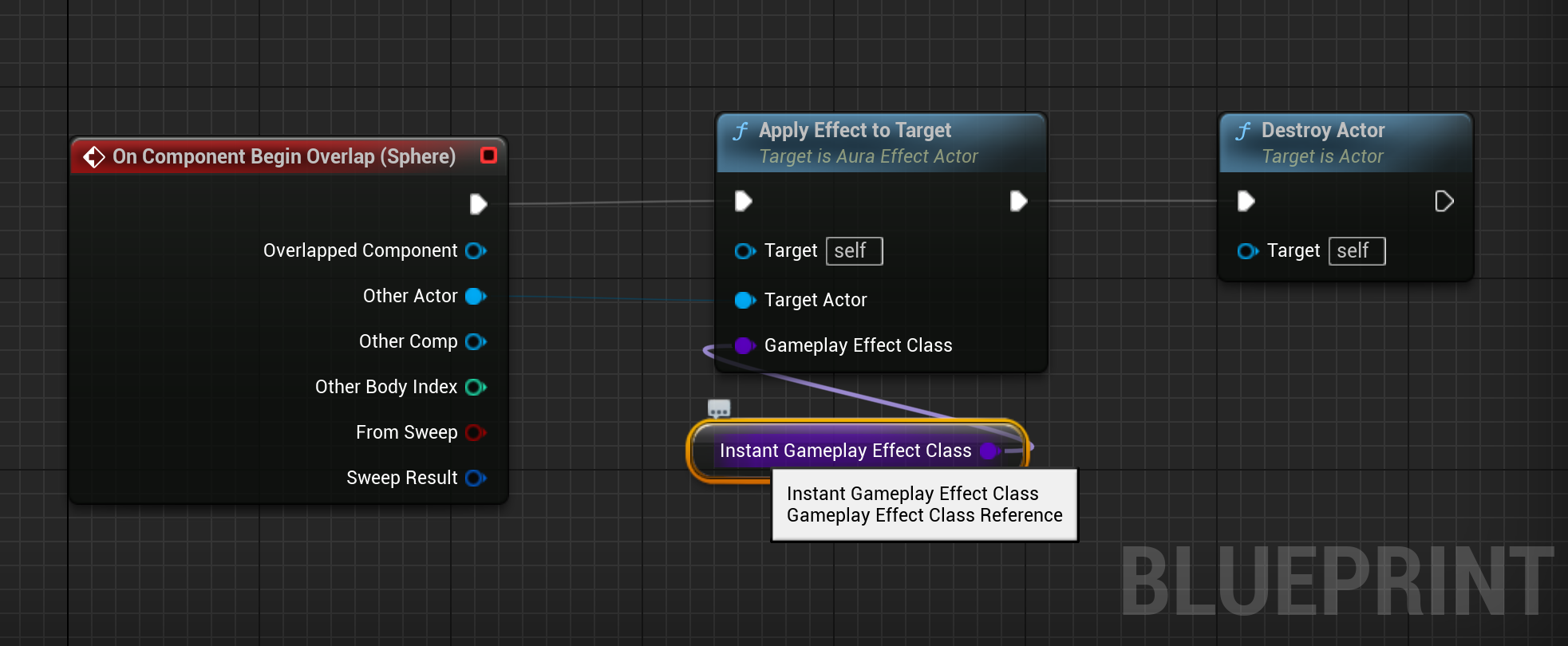
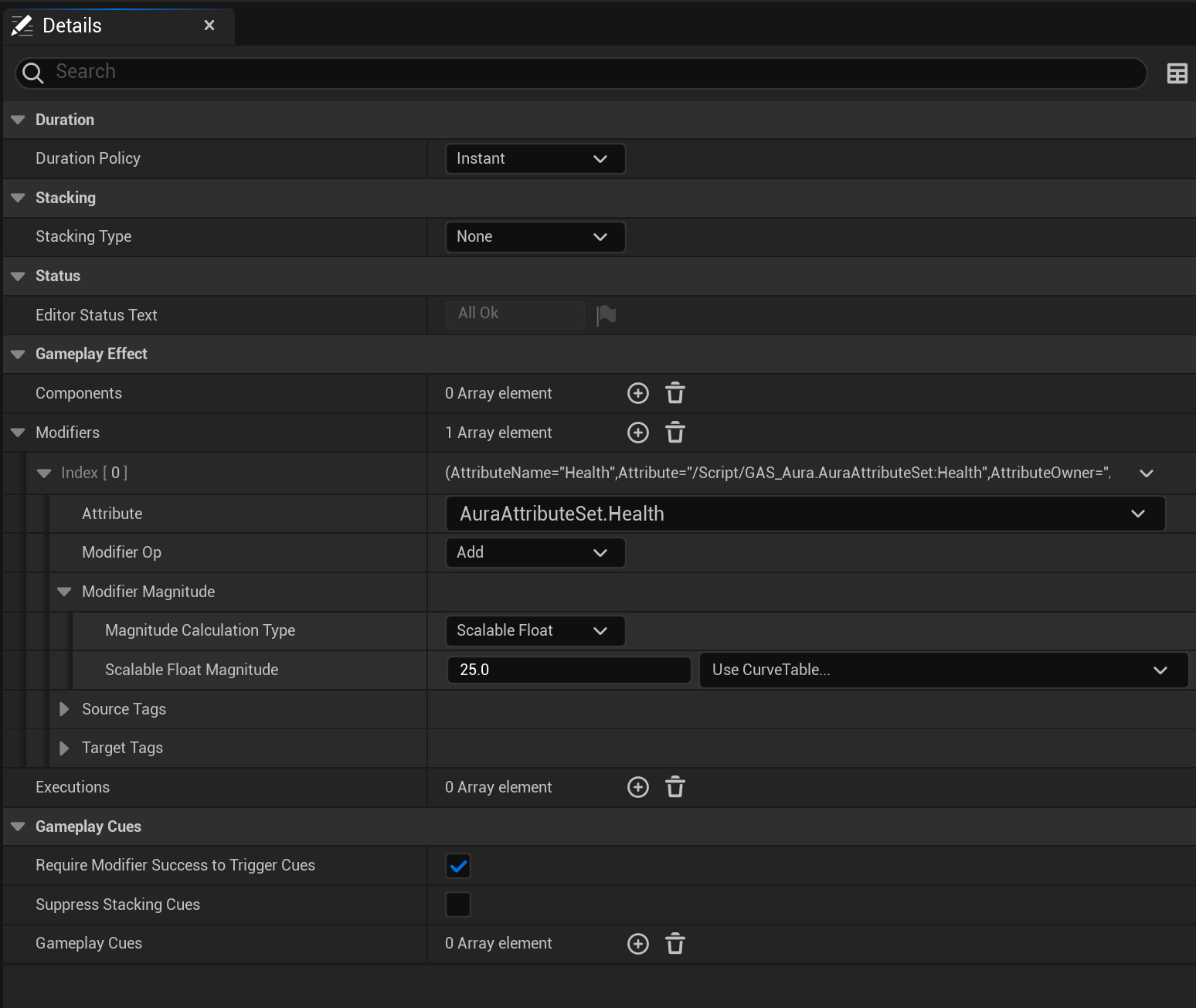
-
Duration Gameplay Effects
18:21
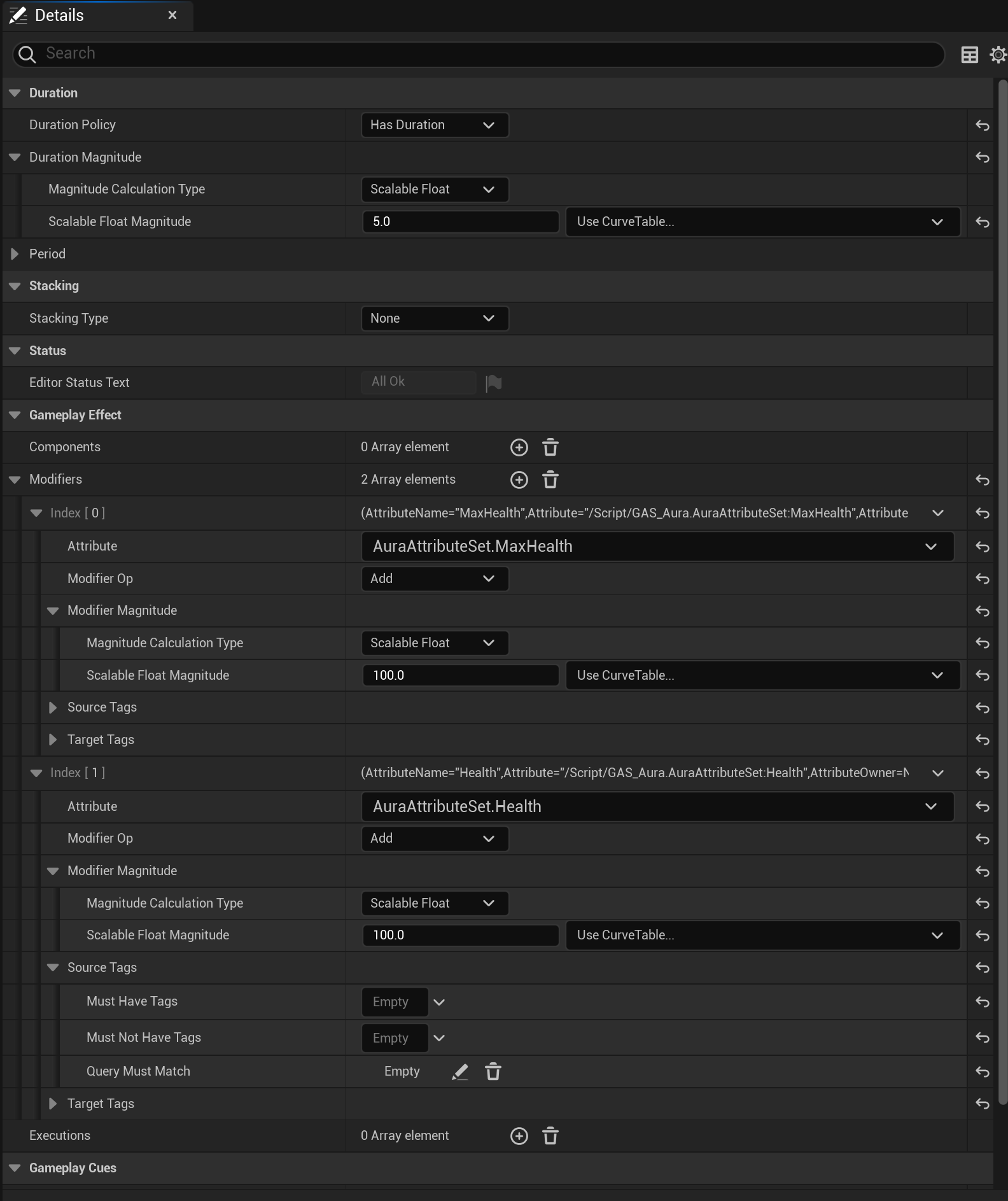
-
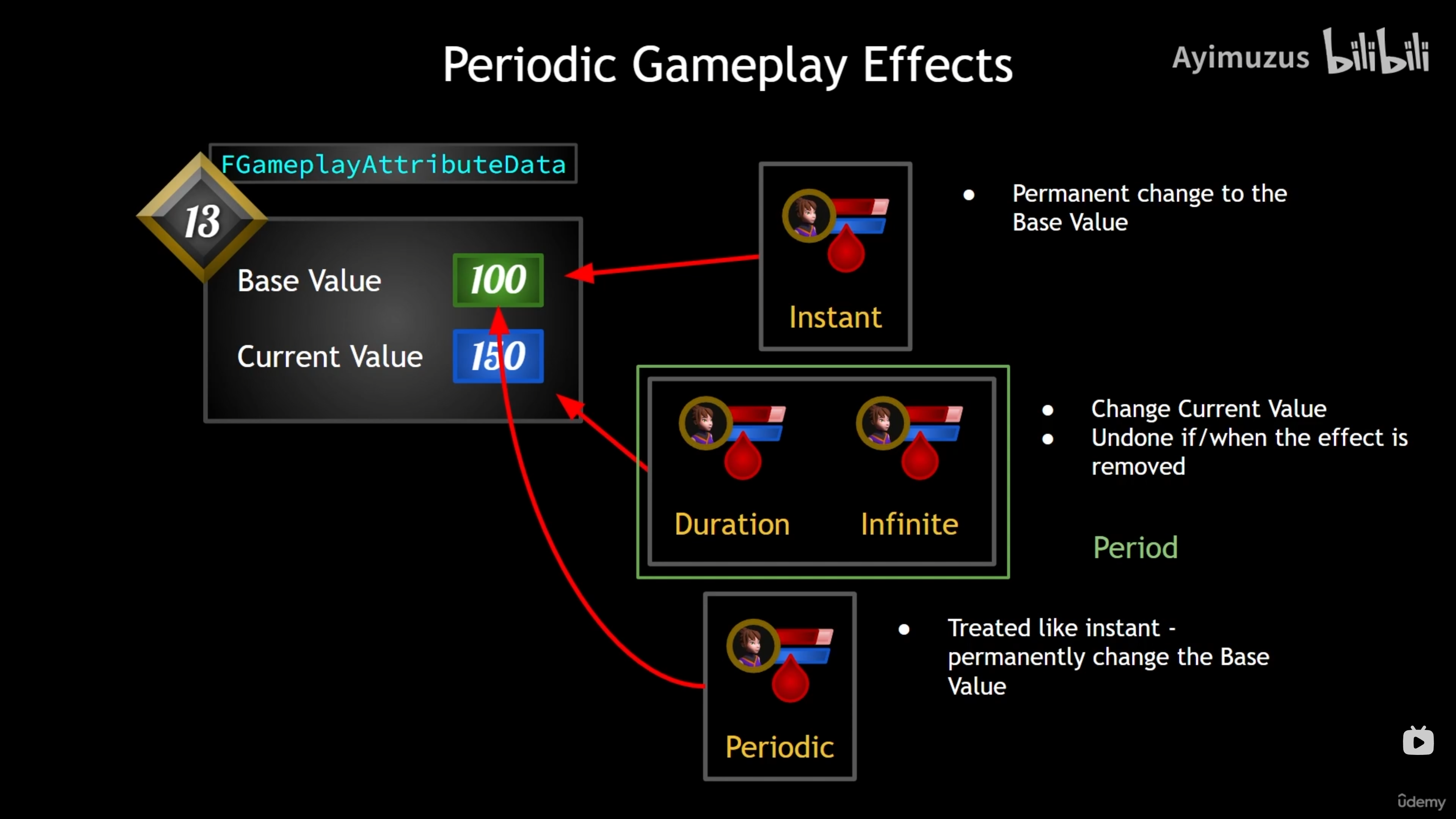
Periodic Gameplay Effects
16:17
-
Effect Stacking
14:36
-
Infinite Gameplay Effects
12:55
🎛️ AuraEffectActor 增强:多类型效果系统
1. 新增枚举类型
1 | // 效果应用策略枚举 |
枚举作用
1 | // EEffectApplicationPolicy:控制何时应用效果 |
2. 扩展的效果类型系统
三种效果类型
1 | // 1. 即时效果(Instant)- 立即生效,无持续时间 |
3. 新增碰撞处理函数
1 | // 重叠开始回调 |
函数设计
1 | // 蓝图可调用:可以在蓝图中手动触发 |
4. 效果移除相关
1 | // 效果移除时是否销毁Actor |
bDestroyOnEffectRemoval作用
1 | // true:当无限效果被移除时,销毁这个Actor |
5. GameplayEffect类型说明
三种效果类型对比
| 类型 | 持续时间 | 应用时机 | 移除时机 |
|---|---|---|---|
| Instant | 立即生效,无持续 | 一次性的 | 无法移除 |
| Duration | 固定时间段 | 定时移除 | 时间到自动移除 |
| Infinite | 永久持续 | 需要手动移除 | 根据策略移除 |
6. 策略配置示例
在编辑器中配置
1 | // 示例1:治疗药水(即时效果) |
7. 当前代码状态
已实现的函数
1 | // 1. 核心效果应用函数(完整实现) |
待实现逻辑
1 | // OnOverlap函数需要实现: |
8. 数据结构设计思路
配置驱动设计
1 | // 通过UPROPERTY配置,而不是硬编码 |
策略模式应用
1 | // 使用枚举控制行为,而不是if-else逻辑 |
9. 与碰撞组件的配合
建议的蓝图设置
1 | 在AuraEffectActor蓝图中: |
10. 当前架构优势
1 | // 1. 支持多种效果类型(Instant/Duration/Infinite) |
总结:这个扩展将AuraEffectActor从一个简单的即时效果应用器升级为完整的、可配置的多类型效果系统,支持三种GameplayEffect类型和灵活的应用/移除策略。
-
Instant and Duration Application Policy
04:16
⏰ AuraEffectActor:即时与持续效果应用策略
1. OnOverlap函数实现
1 | void AAuraEffectActor::OnOverlap(AActor* TargetActor) |
执行逻辑
1 | 玩家进入碰撞区域(OnOverlap): |
2. OnEndOverlap函数实现
1 | void AAuraEffectActor::OnEndOverlap(AActor* TargetActor) |
执行逻辑
1 | 玩家离开碰撞区域(OnEndOverlap): |
3. 策略组合示例
药水效果(进入时治疗)
1 | InstantGameplayEffectClass = GE_HealthPotion |
陷阱效果(离开时伤害)
1 | DurationGameplayEffectClass = GE_PoisonTrap |
双向效果(进入和离开都有不同效果)
1 | // 进入时:获得加速效果 |
4. 策略枚举使用说明
EEffectApplicationPolicy 的三个值
1 | ApplyOnOverlap: // 进入碰撞区域时应用 |
使用模式
1 | // 模式1:只进不出 |
5. 策略执行流程图
graph TD
A[玩家进入碰撞区域] --> B{Instant策略检查}
B -->|ApplyOnOverlap| C[应用即时效果]
B -->|其他| D
D --> E{Duration策略检查}
E -->|ApplyOnOverlap| F[应用持续效果]
E -->|其他| G[跳过]
H[玩家离开碰撞区域] --> I{Instant策略检查}
I -->|ApplyOnEndOverlap| J[应用即时效果]
I -->|其他| K
K --> L{Duration策略检查}
L -->|ApplyOnEndOverlap| M[应用持续效果]
L -->|其他| N[跳过]
6. 与之前架构的对比
之前:固定行为
1 | // 旧版本的OnOverlap: |
现在:策略驱动
1 | // 新版本的OnOverlap: |
总结:这个实现为即时和持续效果添加了灵活的应用策略,可以根据配置在进入或离开碰撞区域时应用不同的效果。但还需要完善无限效果的处理逻辑。
-
Infinite Effect Application and Removal
28:37
♾️ AuraEffectActor:无限效果应用与移除系统
1. 新增关键数据结构
1 | // 存储活动效果句柄和对应的ASC |
数据结构说明
1 | // TMap<键类型, 值类型> |
为什么需要这个映射
1 | // 即时效果:应用后立即完成,不需要追踪 |
2. 头文件新增包含
1 |
3. 变量重命名
1 | // 之前: |
4. 无限效果的特殊性
与其他效果类型的区别
1 | // 即时效果(Instant): |
5. FActiveGameplayEffectHandle 的作用
什么是效果句柄
1 | // 当应用GameplayEffect时,GAS返回一个句柄: |
句柄的特性
1 | // 每个活动效果都有唯一的句柄 |
6. ActiveEffectHandles 映射的使用
存储应用的效果
1 | // 应用无限效果时: |
移除效果时查找
1 | // 需要移除效果时: |
7. 预期的实现逻辑
OnOverlap中的无限效果处理
1 | void AAuraEffectActor::OnOverlap(AActor* TargetActor) |
OnEndOverlap中的无限效果移除
1 | void AAuraEffectActor::OnEndOverlap(AActor* TargetActor) |
8. 无限效果应用场景示例
光环效果(进入区域获得,离开区域失去)
1 | InfiniteGameplayEffectClass = GE_RegenerationAura // 恢复光环 |
永久增益(一次性应用,不自动移除)
1 | InfiniteGameplayEffectClass = GE_PermanentStrengthBuff // 永久力量增益 |
9. 设计优势
灵活的效果管理
1 | // 可以同时管理多个目标的多个无限效果 |
资源管理
1 | // 通过bDestroyOnEffectRemoval控制Actor生命周期 |
总结:这个扩展为AuraEffectActor添加了完整的无限效果管理系统,通过TMap存储效果句柄,实现了精确的效果应用、追踪和移除功能。现在支持三种完整的效果类型,每种都有独立的策略配置。
-
PreAttributeChange
12:16
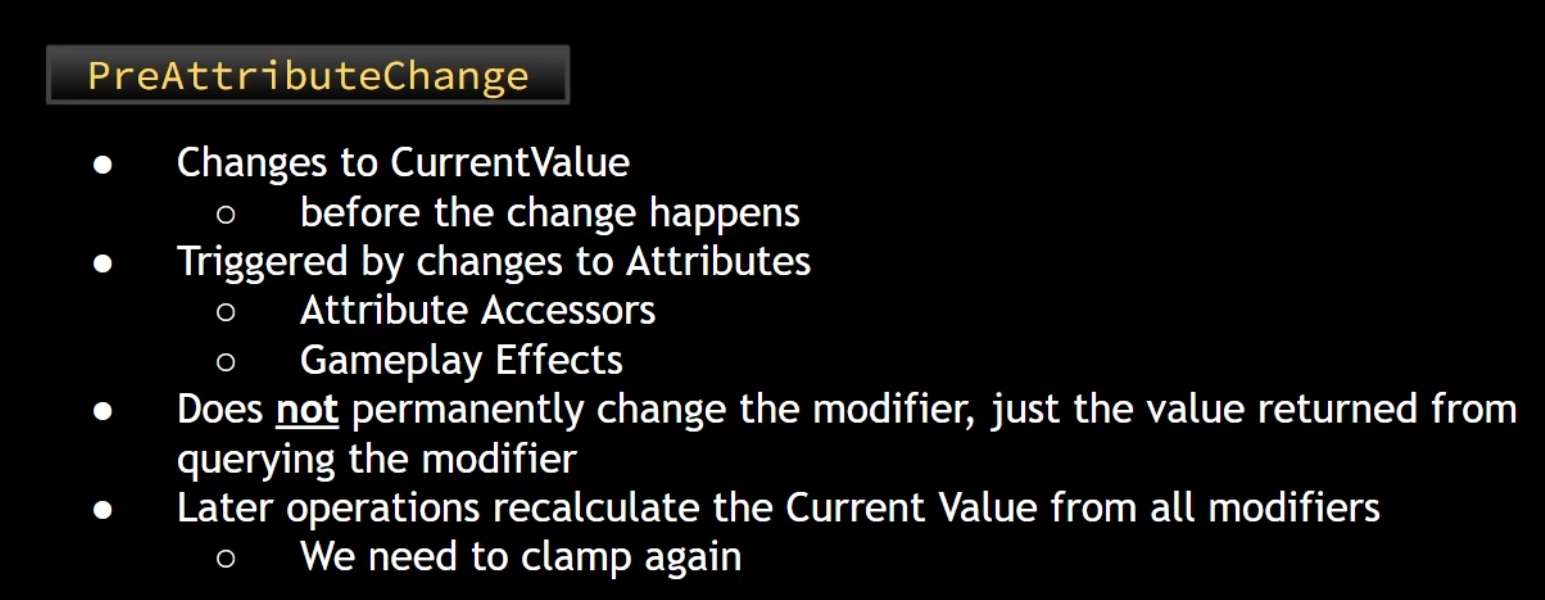
🔧 AuraAttributeSet:属性前变更回调
1. 新增虚函数重写
1 | virtual void PreAttributeChange(const FGameplayAttribute& Attribute, float& NewValue) override; |
函数作用
1 | // 在属性值实际改变之前被调用 |
2. PreAttributeChange 函数实现
1 | void UAuraAttributeSet::PreAttributeChange(const FGameplayAttribute& Attribute, float& NewValue) |
3. 函数参数详解
1 | PreAttributeChange( |
参数说明
| 参数 | 类型 | 作用 |
|---|---|---|
Attribute |
const FGameplayAttribute& |
正在修改的属性引用 |
NewValue |
float& |
将要设置的新值(可修改) |
4. 属性比较方法
1 | // 使用宏生成的属性获取函数进行比较 |
GetHealthAttribute() 的来源
1 | // 来自宏:ATTRIBUTE_ACCESSORS(UAuraAttributeSet, Health) |
5. FMath::Clamp 函数
1 | FMath::Clamp(NewValue, 0.f, GetMaxHealth()) |
| 参数 | 作用 |
|---|---|
NewValue |
要限制的数值 |
0.f |
最小值(下限) |
GetMaxHealth() |
最大值(上限) |
Clamp 的效果
1 | // 如果 NewValue < 0 → 强制设为 0 |
6. 执行时机
GAS 属性修改流程
1 | 1. 开始修改属性(如:玩家受到伤害) |
实际应用示例
1 | // 假设:当前生命值=50,最大生命值=100 |
7. 构造函数中的初始值调整
1 | UAuraAttributeSet::UAuraAttributeSet() |
初始值设计
1 | // 生命值:50/100(50%) |
8. 为什么需要 PreAttributeChange
数据完整性保护
1 | // 防止生命值溢出: |
游戏逻辑一致性
1 | // 确保所有修改都遵守相同的规则 |
9. 与 Clamp 相关的其他属性
当前只限制了 Health 和 Mana
1 | // 为什么只限制 Health 和 Mana? |
如果需要限制最大值属性
1 | // 可以添加对 MaxHealth 和 MaxMana 的限制 |
10. 设计考虑
性能影响
1 | // PreAttributeChange 在每次属性修改时都会调用 |
可扩展性
1 | // 可以轻松添加对其他属性的限制 |
总结:PreAttributeChange 函数为属性修改添加了一层验证保护,确保生命值和魔法值始终保持在有效范围内(0到最大值之间),提高了游戏的稳定性和数据一致性。

PostGameplayEffectExecute
30:57
🔄 AuraAttributeSet:效果后处理系统
1. 新增虚函数重写
1 | virtual void PostGameplayEffectExecute(const FGameplayEffectModCallbackData& Data) override; |
函数作用
1 | // 在GameplayEffect执行完成后被调用 |
2. FEffectProperties 结构体
1 | USTRUCT() |
结构体作用
1 | // 集中存储效果相关的所有信息 |
3. SetEffectProperties 辅助函数
1 | void UAuraAttributeSet::SetEffectProperties(const FGameplayEffectModCallbackData& Data, FEffectProperties& Props) const |
来源端信息提取
1 | // 检查来源ASC是否有效 |
目标端信息提取
1 | // 检查目标AbilityActorInfo是否有效 |
4. PostGameplayEffectExecute 函数实现
1 | void UAuraAttributeSet::PostGameplayEffectExecute(const FGameplayEffectModCallbackData& Data) |
5. FGameplayEffectModCallbackData 参数详解
1 | // Data参数包含的信息: |
Data.EvaluatedData 结构
1 | // EvaluatedData包含: |
6. 执行时机对比
PreAttributeChange vs PostGameplayEffectExecute
1 | // PreAttributeChange(属性前变更): |
完整的属性修改流程
1 | 1. GameplayEffect开始执行 |
7. 效果来源和目标解析
为什么需要这个复杂的信息提取
1 | // 游戏中可能需要: |
典型应用场景
1 | // 场景1:玩家攻击敌人 |
8. 安全检查和空指针处理
多重安全检查
1 | // 来源端检查: |
控制器获取的回退逻辑
1 | // 如果ASC中的控制器为空,尝试从化身Actor获取 |
9. 当前代码状态
已实现的功能
1 | // 1. 结构体定义完成(FEffectProperties) |
后续扩展方向
1 | // 可以在PostGameplayEffectExecute中添加: |
总结:这个扩展为AuraAttributeSet添加了完整的GameplayEffect后处理系统,能够提取详细的来源和目标信息,为后续的游戏逻辑(如经验值系统、状态系统等)提供了基础数据支持。
-
Curve Tables for Scalable Floats
15:19
📚 第五章关键方法总结
AuraEffectActor 基础改进
1 | void ApplyEffectToTarget(AActor* Target, TSubclassOf<UGameplayEffect> GameplayEffectClass); // 应用效果到目标 |
效果策略枚举
1 | UENUM(BlueprintType) |
碰撞处理函数
1 | void OnOverlap(AActor* TargetActor); // 重叠开始 |
三种效果类型系统
1 | TSubclassOf<UGameplayEffect> InstantGameplayEffectClass; // 即时效果 |
效果应用策略变量
1 | EEffectApplicationPolicy InstantEffectApplicationPolicy; // 即时效果策略 |
效果创建函数
1 | FGameplayEffectContextHandle EffectContextHandle = TargetASC->MakeEffectContext(); // 创建效果上下文 |
AuraAttributeSet 属性前变更
1 | virtual void PreAttributeChange(const FGameplayAttribute& Attribute, float& NewValue) override; // 属性前变更回调 |
FEffectProperties 结构体
1 | USTRUCT() |
效果后处理系统
1 | virtual void PostGameplayEffectExecute(const FGameplayEffectModCallbackData& Data) override; // 效果后执行回调 |
效果来源和目标信息提取
1 | Props.SourceASC = Props.EffectContextHandle.GetOriginalInstigatorAbilitySystemComponent(); // 获取来源ASC |
控制器获取逻辑
1 | if (const APawn* Pawn = Cast<APawn>(Props.SourceAvatarActor)) |
GameplayEffectModCallbackData 使用
1 | Data.EffectSpec.GetContext() // 获取效果上下文 |
效果应用流程函数
1 | TargetASC->MakeEffectContext() // 创建效果上下文 |
FGameplayAttributeData 类型
1 | FGameplayAttributeData // GAS属性数据类型 |
属性值限制逻辑
1 | FMath::Clamp(NewValue, 0.f, GetMaxHealth()) // 限制生命值 |
6.Gameplay Tags / 游戏标签
16 个讲座·3 小时 23 分钟 / 16 Lectures · 3 Hours 23 Minutes
Gameplay Tags
05:55
Creating Gameplay Tags in the Editor
07:42
Creating Gameplay Tags from Data Tables
06:22
Adding Gameplay Tags to Gameplay Effects
00:15
Apply Gameplay Tags with Effects
18:18
Gameplay Effect Delegates
12:46
📡 GameplayEffect委托系统
1. 新增AbilityActorInfoSet函数
1 | // UAuraAbilitySystemComponent类 |
函数实现
1 | void UAuraAbilitySystemComponent::AbilityActorInfoSet() |
2. OnGameplayEffectAppliedDelegateToSelf委托
1 | // GAS提供的委托:当GameplayEffect应用到自身时触发 |
委托特性
1 | // 参数类型: |
3. EffectApplied回调函数
1 | void UAuraAbilitySystemComponent::EffectApplied( |
4. 在角色初始化中调用
敌人角色
1 | void AAuraEnemy::InitAbilityActorInfo() |
玩家角色
1 | void AAuraCharacter::InitAbilityActorInfo() |
5. 类型转换的重要性
1 | // 为什么需要Cast? |
6. 执行时机流程
完整的初始化流程
1 | 1. 角色创建 |
委托触发流程
1 | 1. 任何GameplayEffect应用到角色 |
7. 设计模式:观察者模式
委托系统的作用
1 | // 观察者模式实现: |
8. 与AttributeSet的PostGameplayEffectExecute对比
两种回调的区别
1 | // EffectApplied(在ASC中): |
9. 当前的实现状态
已完成的绑定
1 | // ✅ 委托绑定完成 |
待实现的内容
1 | // 🔄 EffectApplied函数目前为空 |
总结:这个系统为GameplayEffect应用添加了事件驱动的响应机制,通过委托系统实现了观察者模式,为后续的战斗反馈、UI显示、音效播放等功能提供了基础框架。
-
Get All Asset Tags
10:34
🏷️ 获取GameplayEffect的所有Asset Tags
1. 新增标签容器获取
1 | void UAuraAbilitySystemComponent::EffectApplied(...) |
2. FGameplayTagContainer 容器
1 | // 用于存储GameplayTag的容器 |
3. EffectSpec.GetAllAssetTags() 函数
1 | // 函数签名: |
Asset Tags vs Dynamic Tags
1 | // Asset Tags(资产标签): |
4. 标签遍历循环
1 | // C++范围for循环遍历标签 |
5. 标签系统工作流程
1 | 1. 在GameplayEffect蓝图中定义Asset Tags |
总结:这个功能为GameplayEffect系统添加了标签处理能力,能够识别和响应不同类型的游戏效果,为后续的UI反馈、音效播放、特效显示等提供了数据基础。标签系统的灵活性使得可以轻松扩展新的效果类型和处理逻辑。
-
Broadcasting Effect Asset Tags
10:03
📢 广播效果资产标签系统
1. 新增委托声明
1 | // 声明效果标签委托 |
委托宏说明
1 | // DECLARE_MULTICAST_DELEGATE_OneParam |
2. 委托变量
1 | // 在UAuraAbilitySystemComponent类中 |
委托作用
1 | // 当GameplayEffect应用时 |
3. EffectApplied函数更新
1 | void UAuraAbilitySystemComponent::EffectApplied(...) |
Broadcast函数
1 | // 触发委托,调用所有绑定的回调函数 |
4. 在WidgetController中绑定委托
BindCallbacksToDependencies函数扩展
1 | void UOverlayWidgetController::BindCallbacksToDependencies() |
5. Lambda表达式绑定
1 | // 使用Lambda表达式绑定委托 |
Lambda表达式语法
1 | // 基本语法: |
6. 标签处理流程
1 | 1. GameplayEffect应用到角色 |
7. 实际应用示例
创建特定效果的GameplayEffect蓝图
1 | // 效果名称:GE_Fireball |
在WidgetController中处理标签
1 | Cast<UAuraAbilitySystemComponent>(AbilitySystemComponent)->EffectAssetTags.AddLambda( |
8. 委托系统的优势
解耦设计
1 | // 发布者(ASC):只负责广播标签 |
多订阅者支持
1 | // 多个系统可以同时订阅: |
9. 完整的标签处理系统架构
graph TD
A[GameplayEffect应用] --> B[ASC:EffectApplied]
B --> C[获取Asset Tags]
C --> D[广播EffectAssetTags委托]
D --> E[WidgetController:Lambda接收]
E --> F[遍历处理每个标签]
F --> G[显示UI提示/播放音效等]
总结:这个系统建立了一个完整的效果标签广播机制,使得UI系统能够实时响应不同类型的游戏效果,为战斗反馈、状态显示、音效播放等提供了灵活的事件驱动架构。
-
UI Widget Data Table
12:40
📊 UI数据表系统:FUIWidgetRow 结构体
1. 新增数据结构:FUIWidgetRow
1 | USTRUCT(BlueprintType) |
继承关系
1 | // 继承自FTableRowBase - UE数据表系统的基础结构 |
2. 结构体成员详解
MessageTag(消息标签)
1 | FGameplayTag MessageTag = FGameplayTag(); |
- 作用:标识UI消息类型的GameplayTag
- 用途:与GameplayEffect的Asset Tags对应
Message(消息文本)
1 | FText Message = FText(); |
- 作用:要显示的文本内容
- 类型:使用FText支持本地化
MessageWidget(消息Widget类)
1 | TSubclassOf<UAuraUserWidget> MessageWidget; |
- 作用:指定显示消息的自定义Widget类
- 限制:必须是UAuraUserWidget或其子类
Image(图像资源)
1 | UTexture2D* Image = nullptr; |
- 作用:关联的图标或图片资源
- 示例:技能图标、状态图标
3. MessageWidgetDataTable 数据表引用
1 | UPROPERTY(EditDefaultsOnly, BlueprintReadOnly, Category = "Widget Data") |
属性说明
1 | EditDefaultsOnly: // 只能在类默认值中编辑 |
4. 当前代码状态
已有的绑定
1 | // 在BindCallbacksToDependencies中: |
5. 数据结构设计思路
数据表与标签的映射
1 | // GameplayEffect中的Asset Tags示例: |
数据驱动UI系统
1 | // 分离数据与逻辑: |
6. 与其他系统的关系
与GameplayEffect系统的集成
1 | // 工作流程: |
与现有属性系统的对比
1 | // 属性变化系统:处理数值更新(OnHealthChanged等) |
7. 结构体使用方式
在编辑器中创建数据表
1 | // 步骤: |
总结:这个数据表系统为游戏效果提供了可配置的UI反馈机制,通过GameplayTag将GameplayEffect与UI消息关联起来,实现了数据驱动的UI显示系统。
-
Retrieving Rows from Data Tables
16:17
🔧 模板函数:GetDataTableRowByTag
1. 新增模板函数声明
1 | template<typename T> |
模板参数说明
1 | // <typename T>:类型参数 |
2. 模板函数实现
1 | template <typename T> |
3. 函数参数详解
UDataTable DataTable*
1 | // 要查询的数据表指针 |
const FGameplayTag& Tag
1 | // 用于查找行的标签 |
4. DataTable->FindRow函数
1 | DataTable->FindRow<T>( |
Tag.GetTagName()
1 | // 将FGameplayTag转换为FName |
返回值
1 | // 找到:返回对应行数据的指针(T*) |
5. Lambda中的使用
1 | Cast<UAuraAbilitySystemComponent>(AbilitySystemComponent)->EffectAssetTags.AddLambda( |
6. 模板函数的作用
通用数据表查询
1 | // 可以查询任何类型的数据表行 |
类型安全
1 | // 编译时检查类型 |
7. 当前代码状态
已实现的功能
1 | // 1. 模板函数声明和实现完成 |
8. 模板函数的优势
代码复用性
1 | // 一个函数处理多种数据表类型 |
编译时类型检查
1 | // 如果调用时类型错误,编译时会报错 |
9. Lambda捕获列表 [this]
1 | // Lambda表达式:[this] |
10. 完整的查询流程
1 | // 简化后的流程: |
总结:这个模板函数提供了一个通用的数据表查询工具,可以根据GameplayTag查找任何类型的数据表行。它简化了数据访问逻辑,提高了代码的复用性和类型安全性。
-
Broadcasting Data Table Rows
15:49
📤 广播数据表行:MessageWidgetRowDelegate
1. 新增委托声明
1 | DECLARE_DYNAMIC_MULTICAST_DELEGATE_OneParam(FMessageWidgetRowSignature, FUIWidgetRow, Row); |
委托参数
1 | // FMessageWidgetRowSignature:委托类型名 |
2. 委托变量
1 | UPROPERTY(BlueprintAssignable, Category="GAS|Messages") |
属性说明
1 | BlueprintAssignable: // 蓝图可以绑定到这个委托 |
3. 标签匹配逻辑
1 | // 创建基础消息标签 |
MatchesTag函数
1 | // 检查标签是否匹配另一个标签或其子标签 |
4. 数据表行查找与广播
1 | // 1. 查找数据表行 |
GetDataTableRowByTag调用
1 | // 使用模板函数查找 |
5. 前向声明修正
1 | // 修正前(错误): |
6. 完整的标签处理流程
1 | // Lambda中的完整逻辑: |
7. 标签命名规范
效果标签 vs 消息标签
1 | // 效果标签(GameplayEffect中使用): |
标签前缀系统
1 | // 标签前缀: |
8. MessageWidgetRowDelegate的使用
在蓝图中绑定
1 | // 蓝图可以: |
广播参数传递
1 | // 广播FUIWidgetRow结构体(值传递) |
9. 安全性检查
空指针检查
1 | // 应该添加的检查: |
10. 标签匹配的工作原理
标签层级系统
1 | // 标签是分层的: |
11. 当前系统的工作流程
1 | 1. GameplayEffect应用 → 获取效果标签(如:"Effect.Damage.Fire") |
12. 委托分类整理
1 | // 属性变化委托(Category="GAS|Attributes") |
总结:这个系统实现了效果标签到UI消息的完整转换流程。通过标签匹配机制筛选消息标签,在数据表中查找对应的UI配置,然后通过委托广播给UI系统显示。实现了GameplayEffect系统与UI系统的解耦和灵活配置。
-
Message Widget
15:24
-
Animating the Message Widget
17:38
-
Replacing Callbacks with Lambdas
09:44
🔄 使用Lambda替换回调函数
1. 委托统一化
1 | // 之前:四个不同的委托类型 |
2. 删除成员函数
1 | // 删除的成员函数: |
3. Lambda绑定属性变化委托
生命值变化绑定
1 | AbilitySystemComponent->GetGameplayAttributeValueChangeDelegate( |
魔法值变化绑定
1 | AbilitySystemComponent->GetGameplayAttributeValueChangeDelegate( |
4. Lambda语法分析
捕获列表 [this]
1 | // 捕获当前类的this指针 |
参数列表
1 | (const FOnAttributeChangeData& Data) |
函数体
1 | { |
5. 与之前AddUObject的对比
之前的方式(AddUObject)
1 | // 需要定义成员函数 |
现在的方式(AddLambda)
1 | // 直接在绑定处定义逻辑 |
6. 代码简化效果
行数减少
1 | // 之前: |
逻辑集中
1 | // 之前:逻辑分散在多个函数中 |
7. Lambda的优势
减少代码量
1 | // 无需为简单的转发逻辑创建单独函数 |
提高可读性
1 | // 绑定逻辑和回调逻辑在一起 |
减少命名负担
1 | // 无需为简单回调函数想名字 |
8. 当前的绑定结构
属性变化绑定(4个)
1 | 1. Health属性变化 → OnHealthChanged委托 |
效果标签绑定(1个)
1 | EffectAssetTags委托 → 处理消息标签 → 广播数据表行 |
9. Lambda的性能考虑
内存开销
1 | // Lambda创建小型的匿名函数对象 |
内联优化
1 | // 编译器更容易内联Lambda逻辑 |
10. 委托变量的使用
仍然使用单独的委托变量
1 | // 虽然委托类型统一了 |
蓝图绑定不受影响
1 | // 蓝图中仍然可以: |
11. 代码组织结构
BindCallbacksToDependencies现在包含
1 | 1. 4个属性变化的Lambda绑定 |
函数变长但更完整
1 | // 好处:一次性看到所有绑定关系 |
12. Lambda的局限性
不适合复杂逻辑
1 | // 如果回调逻辑很复杂 |
调试难度
1 | // Lambda在调试器中显示为匿名函数 |
总结:使用Lambda表达式简化了属性变化回调的代码结构,减少了函数定义和文件跳转,使绑定逻辑更加集中和清晰。对于简单的转发逻辑,Lambda是更简洁的选择。
-
Ghost Globe
33:43
-
Properly Clamping Attributes
09:41
🔒 属性双重钳制系统
1. 新增PostGameplayEffectExecute处理
1 | void UAuraAttributeSet::PostGameplayEffectExecute(const FGameplayEffectModCallbackData& Data) |
2. Data.EvaluatedData结构
1 | // EvaluatedData包含: |
属性比较
1 | // 检查被修改的属性 |
3. 双重钳制的作用
第一层:PreAttributeChange
1 | // 时机:属性值改变之前 |
第二层:PostGameplayEffectExecute
1 | // 时机:GameplayEffect执行完成后 |
4. 为什么需要双重钳制
场景分析
1 | // 假设:当前生命值=80,最大生命值=100 |
网络同步考虑
1 | // 服务器和客户端可能不同步 |
5. FMath::Clamp函数使用
1 | // 语法:FMath::Clamp(Value, Min, Max) |
6. SetHealth vs GetHealth
属性访问器函数
1 | // 来自宏:ATTRIBUTE_ACCESSORS |
SetHealth的内部工作
1 | // SetHealth不仅设置值,还会: |
7. 执行时机对比
完整的属性修改流程
1 | 1. GameplayEffect开始执行 |
Pre vs Post的区别
1 | // PreAttributeChange: |
8. 当前只处理Health和Mana
处理的属性
1 | // 当前双重钳制: |
如果需要限制最大值属性
1 | // 可以添加: |
9. Props变量的使用
当前Props未使用
1 | // 虽然提取了效果属性信息 |
总结:双重钳制系统为生命值和魔法值提供了双重安全保障,确保这些关键属性始终在有效范围内。第一层在修改前验证,第二层在修改后确认,构成了完整的数据完整性保护机制。
📚 第六章关键方法总结
Gameplay Effect Delegates(效果委托)
1 | void AbilityActorInfoSet(); // 设置能力Actor信息 |
Asset Tags获取与广播
1 | EffectSpec.GetAllAssetTags(TagContainer); // 获取效果所有Asset Tags |
UI数据表系统
1 | USTRUCT(BlueprintType) |
数据表查询模板函数
1 | template<typename T> |
Lambda表达式替换
1 | AddLambda([this](const FOnAttributeChangeData& Data) { ... }) // Lambda绑定委托 |
属性双重钳制
1 | SetHealth(FMath::Clamp(GetHealth(), 0.f, GetMaxHealth())); // PostGameplayEffectExecute中再次钳制 |
标签匹配检查
1 | Tag.MatchesTag(MessageTag) // 检查标签是否匹配 |
委托变量分类
1 | Category="GAS|Attributes" // 属性变化委托分类 |
成员函数删除
1 | // 删除的四个属性变化回调函数: |
Lambda捕获列表
1 | [this] // 捕获当前对象指针,可访问成员变量 |
效果属性提取
1 | SetEffectProperties(Data, Props) // 提取GameplayEffect的来源和目标信息 |
数据完整性保护
1 | Data.EvaluatedData.Attribute == GetHealthAttribute() // 检查被修改的属性 |
7.RPG Attributes / RPG属性
11个讲座·2 小时 48 分钟 / 11 Lectures · 2 Hours 48 Minutes
Initialize Attributes from a Data Table
14:44
Initialize Attributes with Gameplay Effects
15:52
🎮 使用GameplayEffect初始化属性
1. 新增DefaultPrimaryAttributes属性
1 | // 在AuraCharacterBase类中 |
属性说明
1 | BlueprintReadOnly: // 蓝图可以读取 |
2. InitializePrimaryAttributes函数
1 | // 初始化主属性函数 |
3. InitAbilityActorInfo函数扩展
1 | // 在AuraCharacter::InitAbilityActorInfo末尾添加 |
执行顺序
1 | // 完整的初始化流程: |
4. check宏的使用
1 | // 检查ASC是否有效 |
check宏的作用
1 | // 开发时断言检查 |
5. GameplayEffect创建流程
MakeEffectContext
1 | GetAbilitySystemComponent()->MakeEffectContext() |
MakeOutgoingSpec
1 | GetAbilitySystemComponent()->MakeOutgoingSpec( |
ApplyGameplayEffectSpecToTarget
1 | GetAbilitySystemComponent()->ApplyGameplayEffectSpecToTarget( |
6. 为什么使用GameplayEffect初始化属性
与传统方式的对比
1 | // 传统方式(直接设置): |
配置驱动的优势
1 | // 在GameplayEffect蓝图中配置: |
7. 预期的GameplayEffect配置
DefaultPrimaryAttributes GameplayEffect
1 | // 效果类型:Instant(即时) |
8. 当前代码的问题
网络复制考虑
1 | // 如果角色是网络复制的 |
9. 设计模式:模板方法模式
基类提供框架
1 | // AAuraCharacterBase(基类): |
执行流程模板
1 | // 模板方法模式: |
10. 与现有系统的集成
与AttributeSet的配合
1 | // AttributeSet中定义了属性: |
与UI系统的集成
1 | // 属性初始化后: |
总结:这个系统使用GameplayEffect来初始化角色的主属性,实现了配置驱动的属性设置。通过GameplayEffect系统,属性初始化可以触发完整的GAS事件流程,支持网络复制,并且可以在蓝图中灵活配置。
-
Attribute Based Modifiers
09:09
-
Modifier Order of Operations
11:08
-
Modifier Coefficients
06:54
-
Secondary Attributes
13:47
-
Derived Attributes
31:39
-
Custom Calculations
06:14
-
Player Level and Combat Interface
13:07
-
Modifier Magnitude Calculations
37:27
-
Initializing Vital Attributes
07:47
8.Attribute Menu / 属性菜单
21个讲座·4 小时 42 分钟 / 21 Lectures · 4 Hours 42 Minutes
Attribute Menu - Game Plan
05:20
Attribute Menu - Framed Value
11:08
Attribute Menu - Text Value Row
08:28
Attribute Menu - Text Value Button Row
06:43
Attribute Menu - Construction
18:43
Button Widget
21:34
Wide Button Widget
09:19
Opening the Attribute Menu
07:06
Closing the Attribute Menu
05:40
Plan for Displaying Attribute Data
10:07
Gameplay Tags Singleton
09:52
Aura Asset Manager
14:48
Native Gameplay Tags
09:10
Attribute Info Data Asset
15:46
Attribute Menu Widget Controller
05:17
Aura Ability System Blueprint Library
15:05
Constructing the Attribute Menu Widget Controller
17:07
Attribute Info Delegate
20:30
Widget Attribute Tags
16:01
Mapping Tags to Attributes
37:58
Responding to Attribute Changes
16:07
9.Gameplay Abilities / 游戏技能
15 个讲座·3 小时 56 分钟 / 15 Lectures · 3 Hours 56 Minutes
Gameplay Abilities
05:09
Granting Abilities
15:07
Settings on Gameplay Abilities
18:31
Input Config Data Asset
22:19
Aura Input Component
14:52
Callbacks for Ability Input
12:46
Activating Abilities
27:22
Click To Move
16:23
Setting Up Click to Move
18:17
Setting Up Auto Running
11:48
Implementing Auto Running
11:42
Code Clean Up
11:29
Aura Projectile
14:25
Aura Projectile Spell
13:37
Spawning Projectiles
22:33
10.Ability Tasks / 技能任务
15 个讲座·3 小时 53 分钟 / 15 Lectures · 3 Hours 53 Minutes
Ability Tasks
16:54
Sending Gameplay Events
10:38
Spawn FireBolt from Event
05:50
Custom Ability Tasks
20:18
Target Data
06:10
Send Mouse Cursor Data
13:42
Receiving Target Data
16:11
Prediction in GAS
10:53
Orienting the Projectile
16:55
Motion Warping
15:16
Projectile Impact
16:05
Projectile Collision Channel
09:31
Projectile Gameplay Effect
23:42
Enemy Health Bar
30:23
Ghost Bar
20:56
11.RPG Character Classes / RPG角色职业
5 个讲座·1小时 11分钟 / 5 Lectures · 1 Hour 11 Minutes
RPG Character Classes
06:24
Character Class Info
07:27
Default Attribute Effects
04:28
Curve Tables - CSV and JSON
29:52
Initializing Enemy Attributes
22:40
12.Damage / 伤害
17个讲座·4 小时 32 分钟 / 17 Lectures · 4 Hours 32 Minutes
Meta Attributes
04:29
Damage Meta Attribute
08:44
Set By Caller Magnitude
07:37
Ability Damage
14:46
Enemy Hit React
26:52
Activating the Enemy Hit React Ability
17:32
Enemy Death
12:49
Dissolve Effect
22:19
Floating Text Widget
15:03
Showing Damage Text
25:24
Execution Calculations
06:29
Damage Execution Calculation
08:39
ExecCalcs - Capturing Attributes
28:27
Implementing Block Chance
18:30
Implementing Armor and Armor Penetration
12:25
Damage Calculation Coefficients
24:57
Implementing Critical Hits
17:23
13.Advanced Damage Techniques / 高级伤害技术
14 个讲座·4 小时16 分钟 / 14 Lectures · 4 Hours 16 Minutes
The Gameplay Effect Context
34:48
Custom Gameplay Effect Context
14:24
NetSerialize
27:41
Implementing Net Serialize
07:23
Struct Ops Type Traits
07:46
Aura Ability System Globals
11:17
Using a Custom Effect Context
23:00
Floating Text Color
19:23
Hit Message
16:17
Damage Types
20:25
Mapping Damage Types to Resistances
10:23
Resistance Attributes
21:30
Resistance Damage Reduction
17:42
Multiplayer Test
23:59
14.Enemy AI / 敌人AI
14 个讲座·2 小时 33 分钟 / 14 Lectures · 2 Hours 33 Minutes
Enemy AI Setup
04:43
AI Controller Blackboard and Behavior Tree
15:41
Behavior Tree Service
10:25
Blackboard Keys
13:40
Finding the Nearest Player
09:10
AI and Effect Actors
15:12
Behavior Tree Decorators
18:39
Attack Behavior Tree Task
10:33
Find New Location Around Target
14:43
Environment Query System
03:24
Environment Queries
09:29
EQS Tests
09:59
Distance Test
05:21
Using EQS Queries in Behavior Trees
11:44
15.Enemy Melee Attacks / 敌人近战攻击
13 个讲座·3 小时8分钟 / 13 Lectures · 3 Hours 8 Minutes
Melee Attack Ability
24:41
Attack Montage
08:05
Combat Target
15:16
Melee Attack Gameplay Event
16:12
Get Live Players Within Radius
32:07
Causing Melee Damage
15:31
Multiplayer Melee Test
03:13
Montage Gameplay Tags
07:26
Tagged Montage
09:36
Multiple Attack Sockets
09:10
Ghoul Enemy
11:58
Ghoul Attack Montages
12:49
Melee Polish
21:56
16.Enemy Ranged Attacks / 敌人远程攻击
9 个讲座·1小时 15 分钟 / 9 Lectures · 1 Hour 15 Minutes
Ranged Attack
06:50
Rock Projectile
03:21
Ranged Damage Curve
03:47
Granting Ranged Attacks
02:51
Slingshot Attack Montage
05:20
Playing the Ranged Attack Montage
13:53
Spawning the Rock Projectile
14:03
Slingshot Animation Blueprint
11:40
Slingshot Attack Montage
13:11
17.Enemy Spell Attacks / 敌人法术攻击
5个讲座·38 分钟 / 5 Lectures · 38 Minutes
Goblin Shaman
07:31
Shaman Attack Montage
04:06
Shaman Attack Ability
10:33
Dead Blackboard Key
07:18
Enemies Multiplayer Testing
08:48
18.Enemy Finishing Touches / 敌人最终完善
26 个讲座·4 小时 33 分钟 / 26 Lectures · 4 Hours 33 Minutes
Goblin Spear - Sound Notifies
06:19
Impact Effects
16:35
Melee Impact Gameplay Cue
18:58
Montage and Socket Tags
22:13
Goblin Spear - Hurt and Death Sounds
07:19
Goblin Slingshot - Sound Notifies
04:31
Rock Impact Effects
07:01
Goblin Shaman - Sound Notifies
04:11
Ghoul - Sound Notifies
10:21
Ghoul - Swipe Trail
04:48
Demon Blueprint
05:55
Demon Melee Attack
14:50
Demon Ranged Attack
11:04
Demon - Sound Notifies
09:43
Demon - Dissolve Effect
01:56
Shaman Summon Locations
28:23
Async Spawn Times
10:34
Summoning Particle Effect
04:54
Select Minion Class at Random
06:01
Minion Summon Montage
05:48
Minion Count
07:34
Elementalist Behavior Tree
09:35
Elementalist Attack Task
14:11
Decrementing Minion Count
12:18
Adding Juice with Tweening
08:25
Enemies Final Polish
19:42
19.Level Tweaks / 关卡调整
5 个讲座·1小时 54 分钟 / 5 Lectures · 1 Hour 54 Minutes
Level Lighting and Post Process
28:39
Texture Streaming Pool Over Budget
20:41
Flame Pillar Actor
13:23
Fade Actor
24:49
Fading Out Obstructing Geometry
26:00
20.Cost and Cooldown / 消耗与冷却
14 个讲座·3 小时 48 分钟 / 14 Lectures · 3 Hours 48 Minutes
Health Mana Spells Widget
16:19
Spell Globe
20:04
Adding Spell Globes
15:21
XP Bar
10:25
Ability Info Data Asset
20:01
Initialize Overlay Startup Abilities
13:26
For Each Ability Delegate
19:46
Binding Widget Events to the Ability Info Delegate
18:55
Gameplay Ability Cost
12:29
Gameplay Ability Cooldown
09:22
Cooldown Async Task
38:18
Cooldown Tags in Ability Info
06:58
Showing Cooldown Time in the HUD
13:43
Modeling Mode
13:02
21.Experience and Leveling Up / 经验与升级
15 个讲座·3 小时 54 分钟 / 15 Lectures · 3 Hours 54 Minutes
Experience and Leveling Up
14:03
Level Up Info Data Asset
16:10
Adding XP to the Player State
11:05
Listening for XP Changes
17:55
Awarding XP Game Plan
06:51
XP Reward for Enemies
16:36
Incoming XP Meta Attribute
04:13
Passively Listening for Events
18:38
Sending XP Events
14:40
Showing XP in the HUD
14:51
Level Up Interface Function
16:59
Leveling Up
21:56
Showing Level in the HUD
24:37
Level Up Niagara System
17:02
Level Up HUD Message
18:17
22.Attribute Points / 属性点
6 个讲座·1小时 15 分钟 / 6 Lectures · 1 Hour 15 Minutes
Attribute Points Member Variable
09:11
Showing Attribute Points in the HUD
08:25
Attribute Upgrade Buttons
08:34
Upgrading Attributes
18:43
Top Off Our Fluids
14:12
Attribute Menu Polish
16:08
23.Spell Menu / 法术菜单
23 个讲座·5 小时 45 分钟 / 23 Lectures · 5 Hours 45 Minutes
Spell Menu Design
06:00
Spell Globe Button
13:10
Offensive Spell Tree
11:45
Passive Spell Tree
09:19
Equipped Spell Row
16:57
Spell Menu Widget
19:52
Spell Description Box
12:05
Spell Menu Button
24:29
Spell Menu Widget Controller
28:45
Constructing the Spell Menu Widget Controller
21:46
Equipped Row Button
26:05
Ability Status and Type
13:33
Showing Abilities in the Spell Tree
24:07
Ability Level Requirement
12:09
Update Ability Statuses
12:34
Updating Status in the Spell Menu
14:07
Show Spell Points
10:10
Selecting Icons
12:12
Deselecting Icons
07:01
Spell Menu Buttons
39:22
Selected Ability
12:14
Spending Spell Points
29:55
Rich Text Blocks
12:59
Spell Descriptions
19:26
FireBolt Description
12:37
Cost and Cooldown in Spell Description
33:40
Self Deselect
11:17
Equipped Spell Row Animations
17:33
Ability Types
22:47
Equipping Abilities
42:03
Updating the Overlay When Equipping Abilities
09:52
Globe Reassigned
07:11
Unbinding Delegates
05:38
24.Combat Tricks / 战斗技巧
15 个讲座·3 小时 42 分钟 / 15 Lectures · 3 Hours 42 Minutes
Debuff Tags
17:45
Debuff Parameters
06:16
Damage Effect Params Struct
24:36
Using Damage Effect Params
14:27
Determining Debuff
23:40
Debuff Info in the Effect Context
18:51
Debuff in the Attribute Set
15:16
Dynamic Gameplay Effects
24:36
Debuff Niagara Component
26:40
Death Impulse Magnitude
05:25
Death Impulse in the Effect Context
12:30
Handling Death Impulse
18:56
Knockback
35:08
25.What a Shock / 震惊法术(示例)
17 个讲座·4 小时 53 分钟 / 17 Lectures · 4 Hours 53 Minutes
FireBolt Projectile Spread
28:39
Spawning Multiple Projectiles
15:28
Homing Projectiles
21:10
Click Niagara System
03:41
Invoke Replicated Event
24:30
Aura Beam Spell
16:37
Electrocute Montage
21:24
Player Block Tags
13:58
GameplayCue Notify Paths
13:38
Gameplay Cue Notify Actor
19:13
Electrocute Looping Sound
06:18
Target Trace Channel
09:37
First Trace Target
28:39
Additional Targets
23:37
Shock Loop Cues on Additional Targets
16:16
Electrocute Cost Cooldown and Damage
08:54
Applying Electrocute Cost and Damage
14:20
Electrocute Polish
24:50
Explode Dem FireBoltz
07:36
Stun
47:55
Stun Niagara System
16:49
Shock Loop Animations
20:19
26.Passive Spells / 被动法术
2 个讲座·8 分钟 / 2 Lectures · 8 Minutes
Passive Spell tags
02:31
Aura Passive Ability
08:08
Passive Ability Info
07:55
Passive Tags in Spell Tree
07:23
Multiple Level Up Rewards
10:18
Passive Ability Activation
37:30
Passive Niagara Component
30:31
27.Arcane Shards / 奥术碎片
18 个讲座·4 小时 39 分钟 / 18 Lectures · 4 Hours 39 Minutes
Magic Circle
12:25
Spawning Magic Circles
11:35
Magic Circle Interface Functions
09:56
Arcane Shards Spell
13:25
Wait Input Press
08:58
Anti Aliasing and Moving Decals
04:10
Point Collection
46:45
Async Point Locations
10:21
Gameplay Cue Notify Burst
17:26
Arcane Shards Montage
14:36
Radial Damage Parameters
19:29
Setting Radial Damage Parameters
10:18
Radial Damage with Falloff
21:18
Tying Radial Damage All Together
27:10
Ignore Enemies while Magic Circle Active
06:52
Knockback Force and Death Impulse Overrides
15:50
Spell Descriptions
13:45
Arcane Shards Cost and Cooldown
14:23
28.Fire Blast / 火焰冲击
9 个讲座·1小时 59 分钟 / 9 Lectures · 1 Hour 59 Minutes
FireBlast Ability
12:36
FireBlast Cost and Cooldown
05:44
Aura Fire Ball
12:21
Spawning FireBalls
10:02
FireBall Timelines
17:39
Causing FireBall Damage
10:51
FireBall Explosive Damage
31:26
Empty Cooldown Texture
05:26
Execute Local Gameplay Cues
12:43
29.Saving Progress / 保存进度
23 个讲座·5 小时 45 分钟 / 23 Lectures · 5 Hours 45 Minutes
Saving Progress
08:54
Main Menu
33:09
Play and Quit Buttons
12:20
Vacant Load Slot
13:41
Enter Name Load Slot
03:42
Taken Load Slot
05:07
Load Menu
11:40
MVVM
07:45
Changes Needed for 5.3+
34:30
View Model Class
13:21
Constructing a View Model
19:31
Load Slot View Model
24:19
Switching the Widget Switcher
19:38
Save Game Object
15:10
Binding Variables to ViewModels
11:15
Load Slot Status
17:19
Enabling the Select Slot Button
09:12
Enabling Play and Delete Buttons
08:34
Are You Sure Widget
24:17
Deleting a Slot
16:48
Map Name Field Notify
16:21
Saving the Map Name
04:17
Traveling to the Saved Map
13:42
30.Checkpoints / 检查点
15 个讲座·3 小时 42 分钟 / 15 Lectures · 3 Hours 42 Minutes
Choosing the Player Start
09:34
Setting the Default Player Start
12:50
Save the Player Start Tag
07:49
Checkpoints
21:18
Interface Function for Saving Progress
19:45
Saving Player Data
08:33
Loading Player Data
15:34
Initializing Attributes From Disk
24:30
Showing Player Level in Load Screen
06:19
Saving Abilities
14:46
Notes on this lecture
00:05
Loading Abilities
29:41
Data Structures for Saving Data
13:15
Saving World State
21:47
Loading World State
15:46
31.Map Entrance / 地图入口
17 个讲座·4 小时 53 分钟 / 17 Lectures · 4 Hours 53 Minutes
Different Highlight Colors
10:10
Highlight Interface
06:47
Targeting Status
23:49
Highlighting Non-Enemies
06:15
Set Move-To Location
15:50
Beacons
15:49
Map Entrance
31:09
Dungeon Stair Entrance
14:04
Dungeon Entrance Blueprints
14:50
Polish Menu
04:58
Spawn Volumes
24:54
Player Death
18:10
Loot Tiers
38:41
Loot Effects
21:06
Loot Drop Curve
12:41
Pickup Sounds
12:46
Quit Button
20:51
32.Course Conclusion / 课程总结
2 个讲座·8 分钟 / 2 Lectures · 8 Minutes
Quest - Levels
01:20
Conclusion - Bonus Video
06:24
- Title: Unreal Engine——《Aura》Gameplay Ability System学习报告
- Author: ELecmark
- Created at : 2025-12-09 14:48:06
- Updated at : 2025-12-18 16:28:47
- Link: https://elecmark.github.io/2025/12/09/《Aura》UE5-Gameplay-Ability-System学习报告/
- License: This work is licensed under CC BY-NC-SA 4.0.